
Original Korean article
ReAct implementation source page (Korean)
This English page mirrors the original series under the English PART 1 page.
If PART 2 explained ReAct actor planning, PART 3 shows how that design closes into real code, a real UI, and a real protocol for collaborating with terminal AIs. Date: 2026-04-14. Audience: developers who already read PART 1 and PART 2.
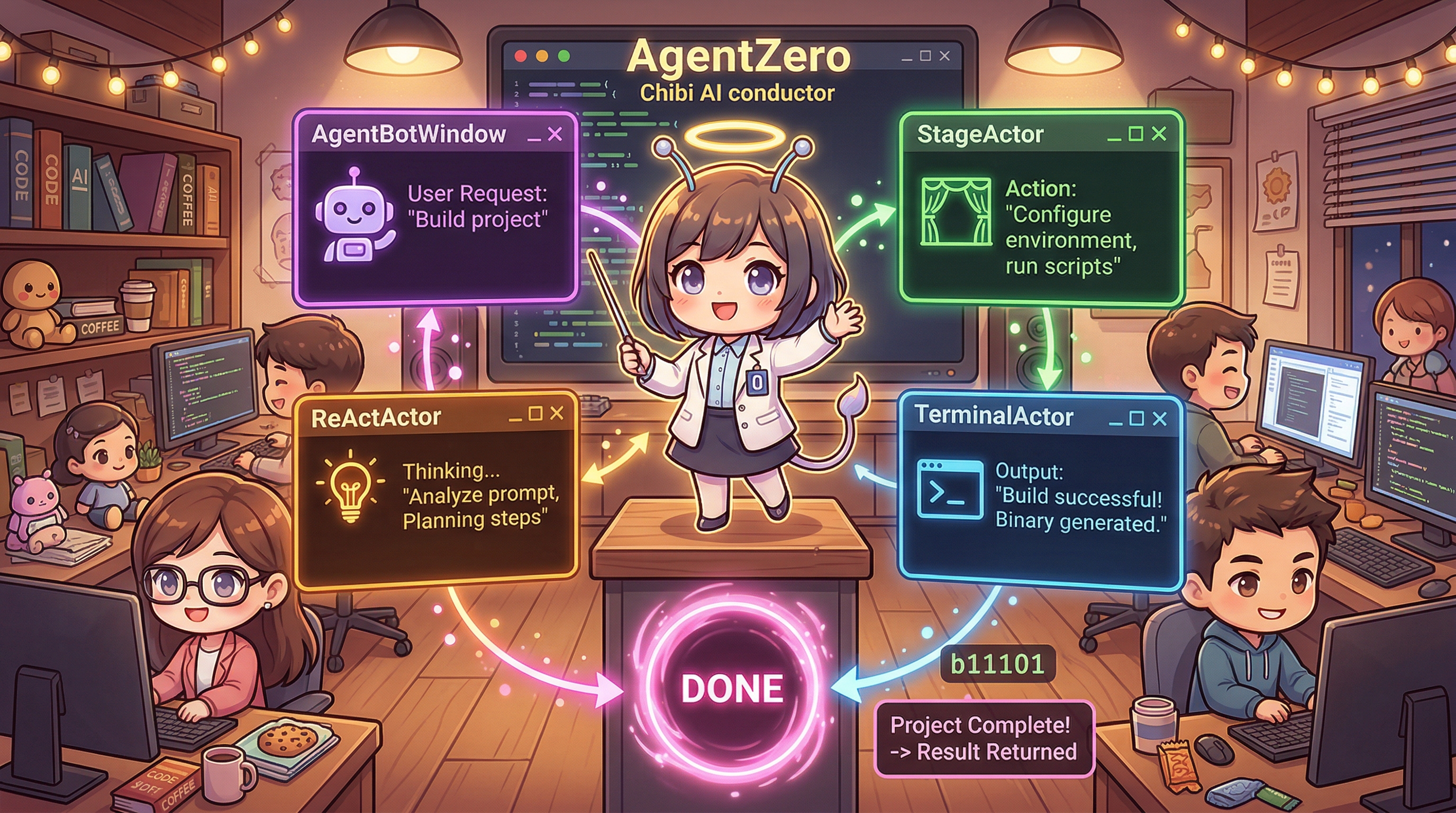
0. Introduction
The conclusion of PART 2 was clear: a general LLM cannot wait on its own. That is why AgentZero needed a ReActActor that wraps Thinking -> Acting -> Waiting -> Complete inside Akka Become().
PART 3 is the next scene. It does not stop at the design document. It shows how that design was wired into the real AgentZero codebase.
AgentBotWindow -> AgentBotActor -> ReActActor -> StageActor -> TerminalActor
                                             -> AI CLI -> bot-chat DONE -> MainWindow
                                             -> StageActor -> AgentBotActor -> ReActActor
What this part covers
- ReAct was implemented not as an abstract pattern, but as a concrete state machine
- The broken link to terminal AIs was bridged through the
/agent-zero+DONE(...)handshake - Real-world issues such as runaway tool use, dropped signals, and endless waiting became controllable through guards and UI feedback
1. A Bird's-Eye View of the Implementation
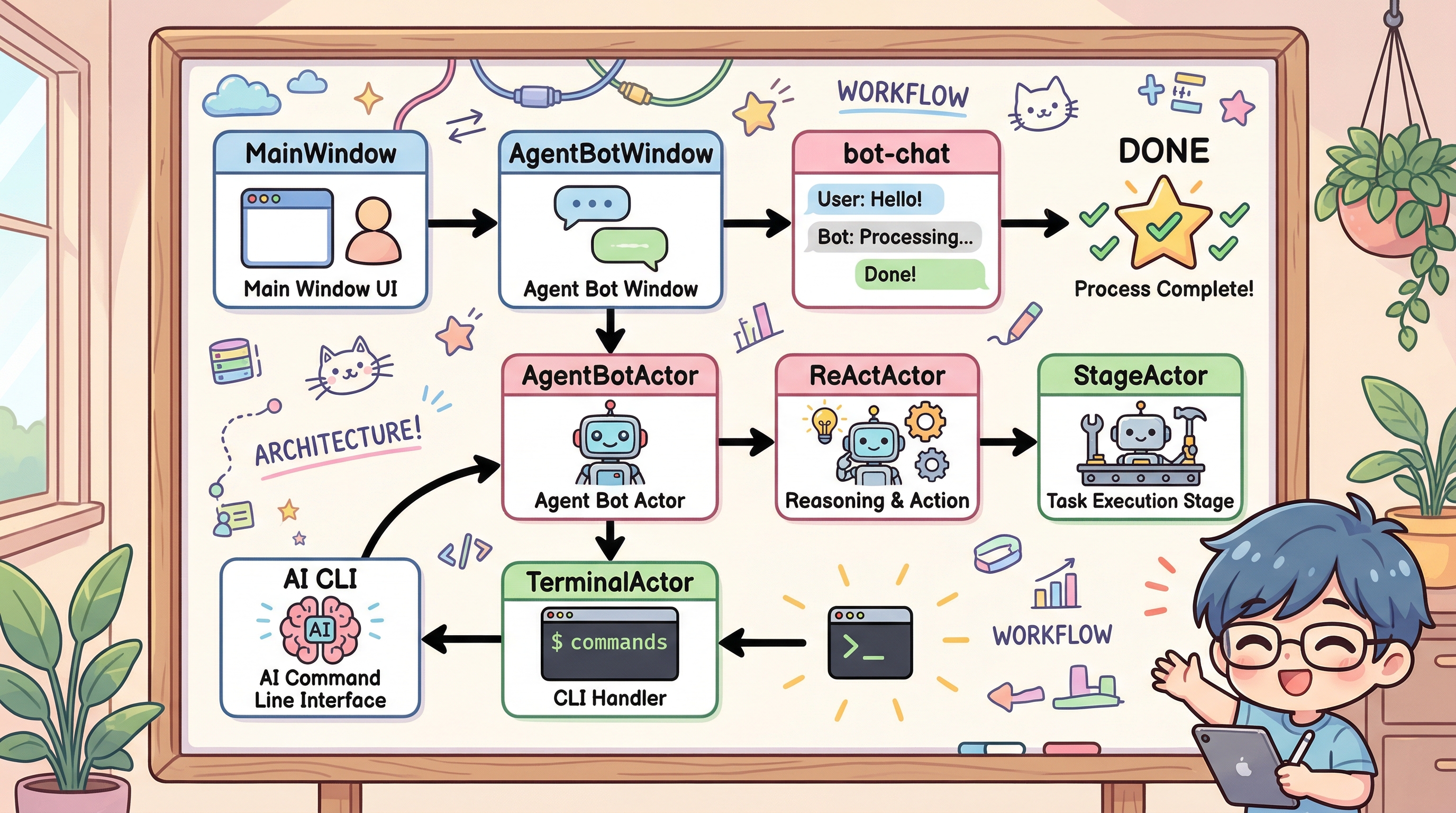
The full implementation closes across five axes inside Project/AgentZeroWpf.
Axis | Concrete files | Responsibility |
|---|---|---|
State machine |
| Transitions between |
Message contract |
| Defines |
Broker layer |
| Forwards traffic between the UI, ReActActor, and terminal messages |
UI layer |
| Owns |
External return channel |
| Acts as the door through which terminal AIs come back via |
Once you see that structure, the PART 1 question, "How does Akka talk to AI-agent CLIs?" stops being abstract and becomes a concrete code path.
2. Demon Slayer's Form Shift - ReActActor Turns the Loop into a State Machine
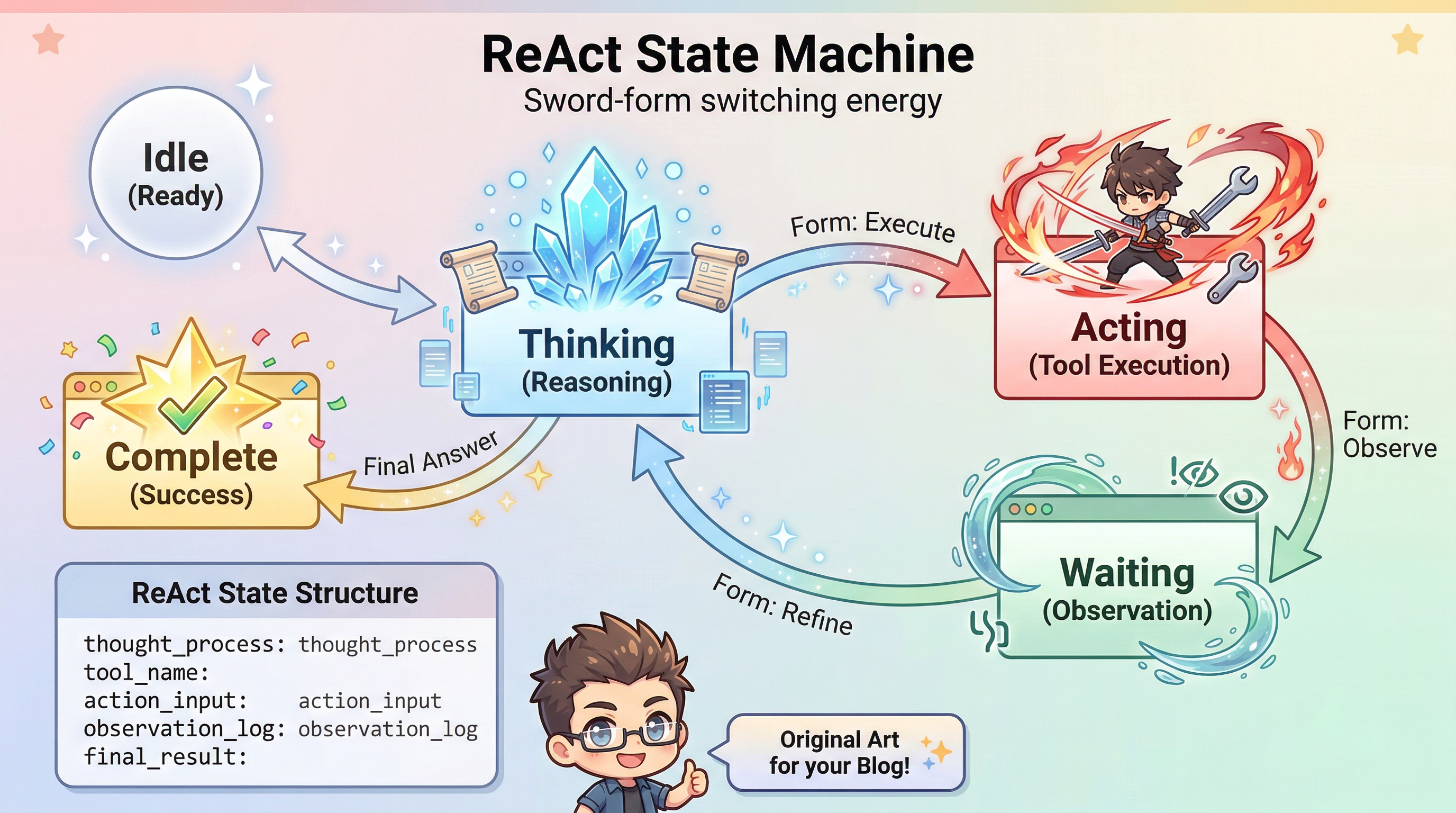
The biggest change was separating the old synchronous RunFunctionCallLoopAsync into its own ReActActor.
Idle
  -> StartReAct
  -> Thinking
  -> Acting
  -> Waiting
  -> Thinking ...
  -> Complete
  -> Idle
The concrete message contract is explicit too.
StartReActReActProgressCompletionSignalSkipWaitingCancelReActTerminalDoneSignalReActResult
The reason this matters is simple. A loop dies when it returns. An actor does not. Once it enters Waiting, an external signal can wake it back into Thinking. The idea from PART 2, teaching an LLM to wait, becomes working code here.
Two supporting foundations that were added earlier remain important as well.
AiMode-DiagnosticLogging.md- the[AI-REQ],[AI-FnCall],[AI-TOOL], and[AI-RESP]logging systemOnDevice-SessionMemory.md- actor-side memory that stores recent work and injects it into the first-roundSystemmessage
ReAct therefore entered the runtime not as a standalone trick, but as an execution engine built on top of logs and memory.
3. Phase 2, Phase 3 - When the Design Lands on Real Buttons
Seen in implementation order, the first turning point came from two completion reports.
3.1 ReAct-Phase2-Complete.md
What was actually finished there?
- Created
Actors/ReActActor.cs - Extended
Actors/Messages.cs - Spawned ReActActor as a child inside
Actors/AgentBotActor.cs - Added state-transition tests in
Project/AgentTest/Actors/ReActActorTests.cs
That means the first real milestone was not "a design." It was a testable actor.
3.2 ReAct-Phase3-Complete.md
The next step was UI integration.
- Added a
ReActcheckbox toAgentBotWindow.xaml - Added
RunReActAsync()toAgentBotWindow.xaml.cs - Branched from the old
FnCallloop into the ReAct path insideStreamAiResponseAsync() - Connected
ReActProgressandReActResultdirectly to the UI throughSetReActCallbacks
From this point onward, ReAct stopped being a back-end experiment and became a mode that users could actually click and use.
4. Your Name + Howl's Door - How the Terminal AI Link Was Rebuilt
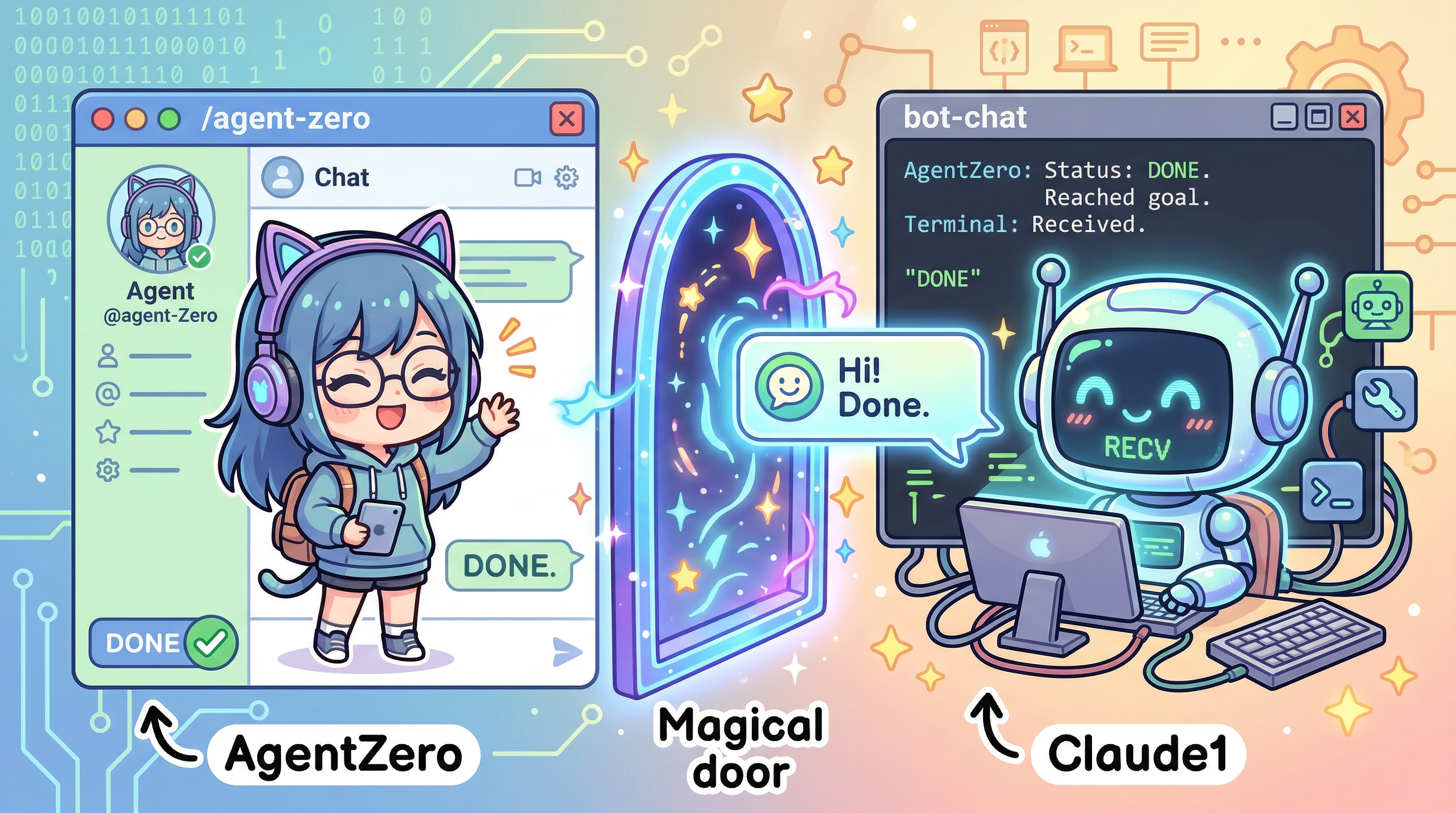
This is where PART 3 becomes concrete. Even if ReActActor is well designed, collaboration does not close if the AI running inside a terminal, such as Claude Code, cannot send a result back.
4.1 Routing only works if the other side knows its name
ReAct-YourName-Identity-Protocol.md exposed a simple but fatal problem.
- AgentZero only said, "I am AgentZero."
- The peer terminal did not know whether its own identity was
Claude1orClaude2. - As a result, it replied with something like
DONE(Claude, ...), using the model family name instead of the routing key.
That forced the handshake text to change.
/agent-zero Hello, I am AgentZero.
Your terminal tab name is 'Claude1'.
After you respond, you must run:
bot-chat.ps1 "DONE(Claude1, summary of your response)"
That one line makes the first argument of DONE the routing key instead of the model label.
4.2 /agent-zero becomes a skill loader
ReAct-SkillActivation-Prompt.md explains the next step. Terminal AIs do not know what bot-chat.ps1 is by default. So every conversation is prefixed with /agent-zero to force-load the skill.
/agent-zero Please review this code
That way the terminal AI reads .claude/skills/agent-zero/SKILL.md, learns how bot-chat.ps1 works, and sends a DONE(...) message at the end. In more traditional systems, SKILL.md is the document-shaped IDL and /agent-zero is the switch that activates the contract.
4.3 Where does DONE return?
Terminal AI
  -> bot-chat.ps1 "DONE(Claude1, reviewed 3 items)"
  -> CliHandler
  -> MainWindow.HandleBotChat()
  -> TerminalDoneSignal
  -> StageActor
  -> AgentBotActor
  -> ReActActor
The actor tree introduced in PART 1 now gains an actual return corridor that reconnects work happening outside the terminal process back into the runtime.
5. Kekkaishi's Barrier - How Tool Runaway Was Contained
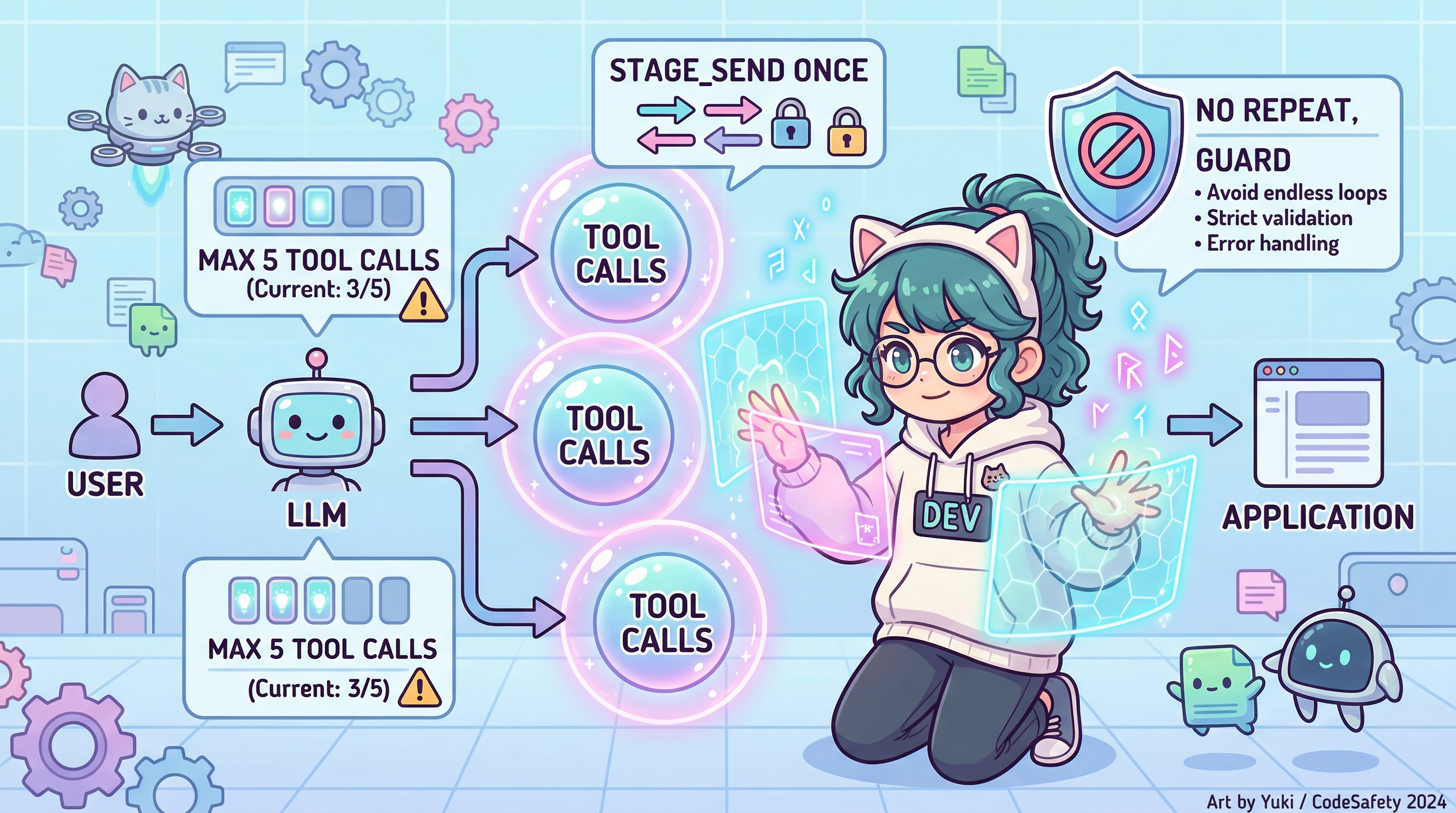
Another class of problem emerged immediately in practice. The smarter the model looked, the more tools it tried to call in one burst.
ReAct-ToolCall-Constraint-Prompting.md summarizes the failures clearly.
- Index explosions like
term_read(tab_index=0..78) - Repeated
term_readcalls - Unrequested over-expansion such as
meeting_create
The implementation uses three defensive layers to stop that behavior.
- Prompt constraints such as "maximum 5 tool calls per response," "only one
stage_sendper response," and "only oneterm_readper response" - Code-side blocking through
response.ToolCalls.Take(5) - Repeated-call protection that returns an error after the same
(function + arguments)combination appears more than three times
This matters because the quality of an agent system is not determined by model intelligence alone. It depends just as much on whether the runtime draws a strong operational boundary around the tools it exposes.
6. Jujutsu Kaisen's Domain Release - Stopping Well Is Harder Than Running Well
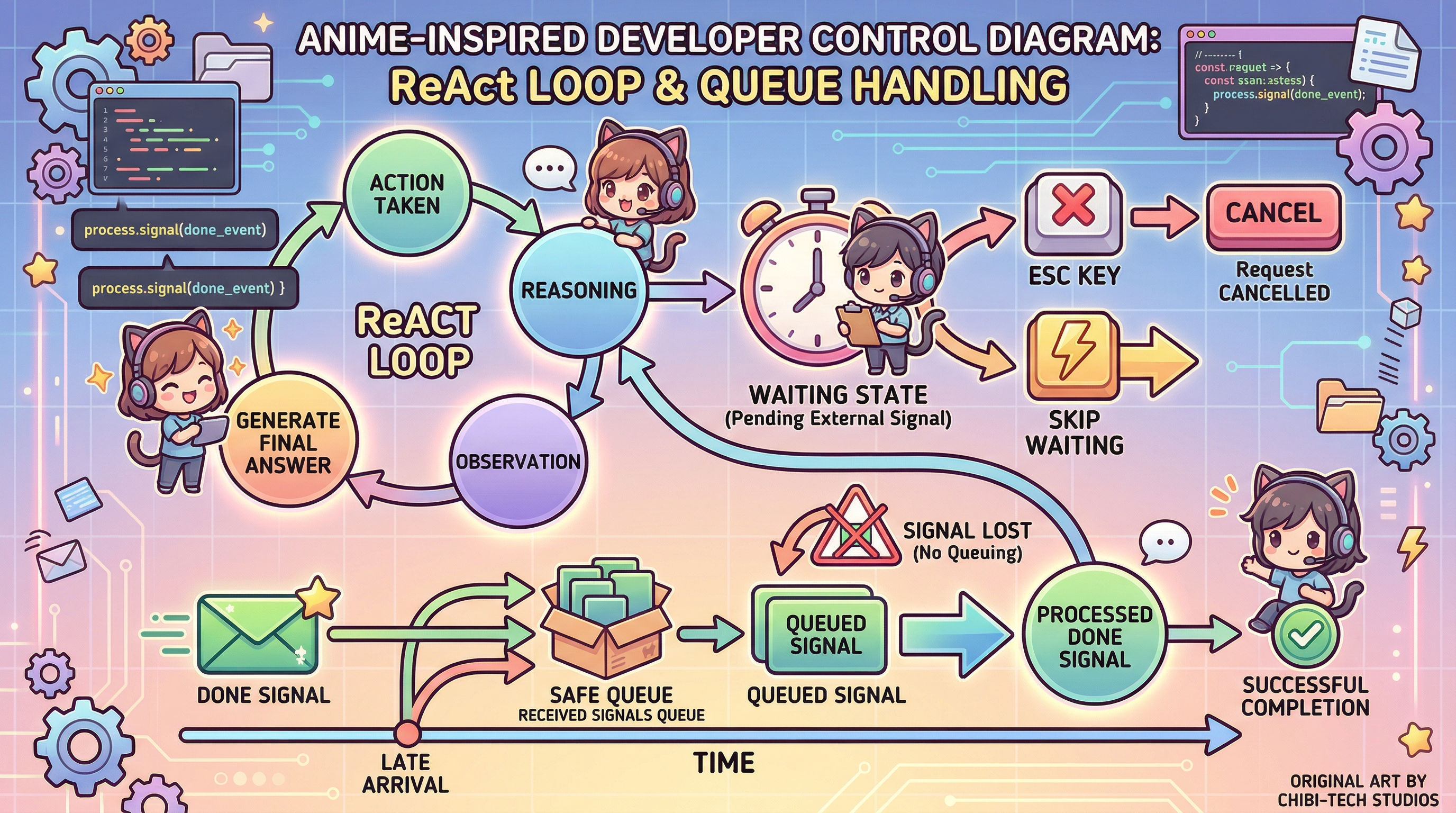
ReAct-SequenceControl-ESC.md contains one of the deepest lessons from the late implementation phase: it is harder to stop a system well than to make it run.
The concrete problem looked like this.
DONEmay arrive five seconds late afterWaitinghas already ended- That late signal may be dropped if the actor is currently in
Thinking
Two devices solved it.
6.1 _pendingDone queueing
If a TerminalDoneSignal arrives while the actor is in Thinking or Acting, it is stored in _pendingDone instead of being discarded. When the actor enters Waiting again, the queued signal is consumed immediately and drives the actor back into Thinking. Late DONE messages no longer evaporate into empty air.
6.2 ESC control
The user also needs a way to control the loop directly.
- Press
ESConce:SkipWaiting - Press
ESCtwice:CancelReAct
That makes ReAct more than "an engine that usually runs by itself." It becomes an engine whose control can be reclaimed by the user.
7. Yu-Gi-Oh!'s Card Field - Making State Visible to the Eye
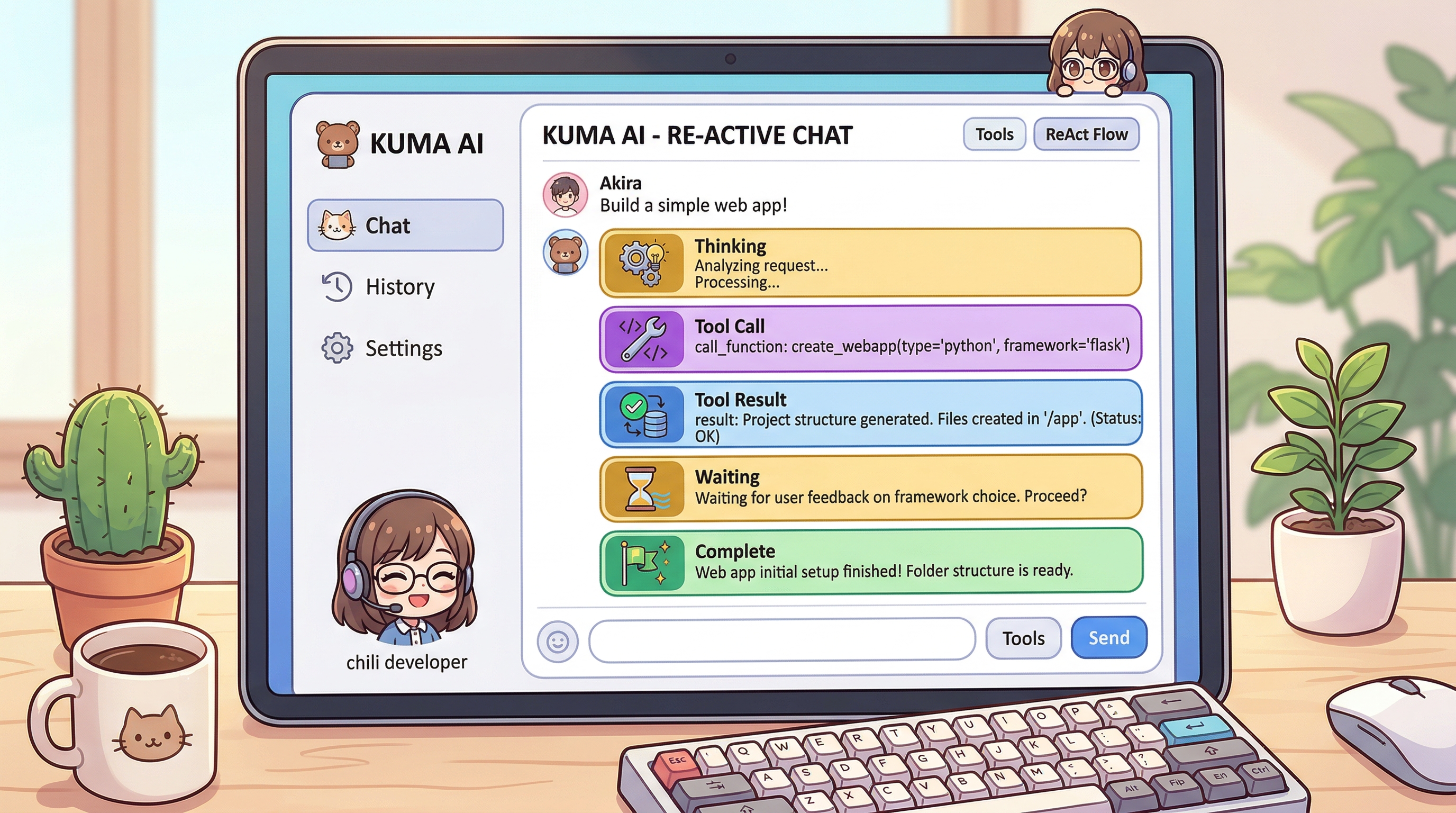
An implementation is not complete if only the developer can understand it. Users need to see where the runtime is currently stuck or moving.
ReAct-UI-CardSystem.md is the result of that requirement.
- Gold card:
Thinking - Purple card: tool call
- Blue card: tool result
- Gold waiting card:
Waiting - Green card: final
Complete
The internal state of ReAct is no longer hidden logic. It is laid out on the field like visible cards. A user can tell immediately whether the runtime is currently reasoning, executing a tool, waiting for completion, or finishing the response.
The combination of RunReActAsync() and HandleReActProgress() is central here. Because the ReActProgress messages emitted by the actor are rendered directly into UI cards, ReAct stops being a system understood only through logs and becomes something you can watch in real time.
8. ActorPlanning Became a Compression of Implementation, Not Just a Design Note
An interesting detail is that ReAct-ActorPlanning.md looks like an early design document, but it was actually written after several implementation problems had already been fought through. That changes its role. It is no longer a pure plan. It is a compressed architecture sheet built from the implementation that already exists.
In short:
- PART 2 explained why
ReActActorwas needed - The improvement documents from PART 3 recorded where the real implementation broke
ReAct-ActorPlanning.mdreorganized that journey one more time from the point of view of a state machine
That means this implementation did not descend top-down in one clean stroke. It was refined through failure logs -> patches -> protocol definition -> UI visualization.
9. One Real Turn in Summary - This Is How ReAct Now Runs
User
  -> AgentBotWindow.RunReActAsync
  -> AgentBotActor.StartReAct
  -> ReActActor.Thinking
  -> stage_status / stage_send("/agent-zero ...")
  -> Waiting
  -> Claude1 runs bot-chat.ps1 "DONE(Claude1, reviewed 3 items)"
  -> MainWindow.HandleBotChat
  -> TerminalDoneSignal
  -> ReActActor.Thinking
  -> final summary response + card UI rendering
Yes, a general LLM can be turned into a working agent. But doing so requires more than changing the model. You have to design the actor state machine, session memory, logs, skill activation, the DONE protocol, and the UI visibility together.
10. Closing
PART 1 showed the actor tree and the communication structure. PART 2 explained why the ReAct state machine was necessary. PART 3 shows how that design actually comes alive inside the codebase.
The core idea is not one glamorous algorithm.
- Make the system capable of waiting through
ReActActor - Reconnect other AIs through
/agent-zeroandDONE(...) - Keep the whole runtime manageable through constraints, queueing, ESC control, and card-based UI feedback
In the end, AgentZero's ReAct implementation is not a story about "the LLM becoming smart on its own." It is a story about how to design a runtime in which an LLM can actually work. In that sense, the Akka actor model acted not merely as a concurrency framework, but as the skeleton that organized the agent runtime itself.
Reference Documents
Tech/DOC/Actor/improvement/ReAct-Phase2-Complete.mdTech/DOC/Actor/improvement/ReAct-Phase3-Complete.mdTech/DOC/Actor/improvement/ReAct-YourName-Identity-Protocol.mdTech/DOC/Actor/improvement/ReAct-ToolCall-Constraint-Prompting.mdTech/DOC/Actor/improvement/ReAct-SequenceControl-ESC.mdTech/DOC/Actor/improvement/ReAct-ActorPlanning.mdTech/DOC/Actor/improvement/ReAct-DONE-Handshake-Protocol.mdTech/DOC/Actor/improvement/ReAct-SkillActivation-Prompt.mdTech/DOC/Actor/improvement/ReAct-UI-CardSystem.mdTech/DOC/Actor/improvement/AiMode-DiagnosticLogging.mdTech/DOC/Actor/improvement/OnDevice-SessionMemory.md