
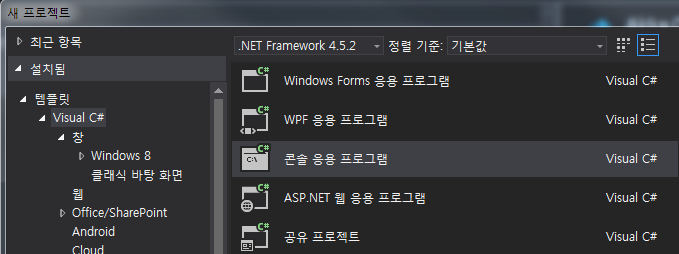
콘솔 APP 프로젝트 생성
실습은 콘솔 APP로 진행예정입니다.
SeviceA로 생성 ( 실습에서 ServiceB,C,D 등 여러가지 테스트 서비스 생성예정 )
LIB 설치
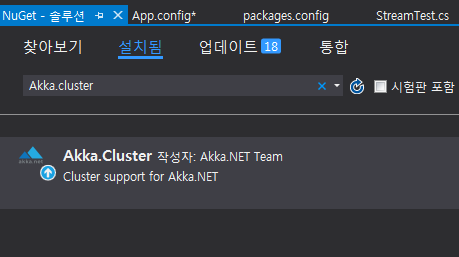
ServiceA 프로젝트에 nuget을 이용하여 라이브러리를 설정합니다.
Akka - Akka.Remote - Akka.Cluster
필요한것만 설치가능하지만, Cluster는 Remote와 Akka 기반 패키지를 모두 포함함으로
Cluster를 설치합니다.
nuget을 통한 라이브러리 설치:
패키지 관리자를 통한 설치
PM> install-package Akka
PM> install-package Akka.Remote
PM> install-package Akka.Cluster
AkkaSystem을 사용하기 위한 최초 코드작성
Program.cs
using System;
using Akka.Actor;

namespace ServiceA
{
    class Program
    {
        static void Main(string[] args)
        {
            ConsoleKeyInfo cki;
            Console.CancelKeyPress += new ConsoleCancelEventHandler(myHandler);
            using (ActorSystem system = ActorSystem.Create("ServiceA"))
            {
                //Actor의 시스템 준비 완료

                while (true)
                {
                    // 메인 어플리케이션 종료방지를 위한코드 ( ctrl+x 종료 )
                    cki = Console.ReadKey(true);
                    if (cki.Key == ConsoleKey.X) break;
                }
            }
        }

        protected static void myHandler(object sender, ConsoleCancelEventArgs args)
        {
            args.Cancel = true;
        }
    }
}
App.config
.net의 어플리케이션 설정과 호환가능: 특이한 형태의 설정으로 JAVA/AKKA 와 설정컨셉 동일
<?xml version="1.0" encoding="utf-8" ?>
<configuration>
    <configSections>
      <section name="akka" type="Akka.Configuration.Hocon.AkkaConfigurationSection, Akka" />
    </configSections>
    <startup>
        <supportedRuntime version="v4.0" sku=".NETFramework,Version=v4.5.2" />
    </startup>
    <akka>
      <hocon>
        <![CDATA[
            akka {
              actor {
                provider = "Akka.Remote.RemoteActorRefProvider, Akka.Remote"
              }
              remote {
                log-remote-lifecycle-events = DEBUG
                log-received-messages = on
                helios.tcp {
                    port = 8001 #bound to a specific port
                    hostname = 127.0.0.1
                }
              }
            }
        ]]>
      </hocon>
    </akka>
</configuration>
var config = ConfigurationFactory.ParseString(@" akka.remote.dot-netty.tcp { transport-class = ""Akka.Remote.Transport.DotNetty.DotNettyTransport,Akka.Remote"" transport-protocol = tcp port = 8091 hostname = ""127.0.0.1"" }"); var system = ActorSystem.Create("MyActorSystem", config);
설정은 파일로 분리되는게 좋지만, 위와같은 형식으로 설정적용도 가능합니다.
실행확인
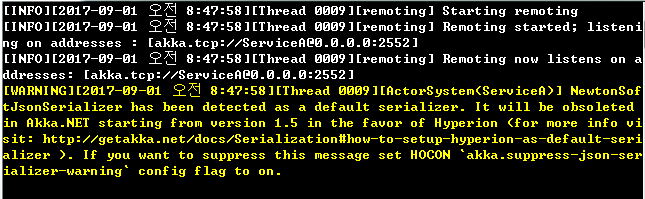
로그의 의미:
자신이 설정한 포트(ex:8001)가 표시되면 정상이다.
listens on a address : akka.tcp://ServiceA@127.0.0.1:8001
( 차기버젼에서 JsonSerialzier가 Hyperion으로 기본 변경예정이니, 바꿀수있으면 바꾸란의미이며 -NewtonSoft에서 다른버젼의 JSON 라이브러리 충돌시 변경가능 )
AKKA 최초설정 소스