
neo4j graph db를 닷넷에서 이용하는 방법을 먼저 알아본후 액터 메시지큐에 그래프db이벤트를 발생시켜, 메시지큐를 통해 추천용 이벤트를 추가하는 방법을 알아보겠습니다. |
docker-compose를 통해 로컬환경구축이 가능하며, neo4j 프로토콜을 사용하여 초기에 로그인을해주면
사용준비가 끝나게됩니다.
version: '2'
services:
  neo4j:
    image: bitnami/neo4j:latest
    ports:
      - '7474:7474'
      - '7473:7473'
- '7687:7687' |
<PackageReference Include="Neo4jClient" Version="4.1.14" /> <PackageReference Include="AkkaDotModule.Webnori" Version="1.1.1" /> |
{
  "Logging": {
    "LogLevel": {
      "Default": "Debug",
      "System": "Information",
      "Microsoft": "Information"
    }
  },
  "AppSettings": {
    "GraphConnection": "http://localhost:7474",
    "GraphConnectionUser": "neo4j",
    "GraphConnectionPw": "bitnami"
  }
} |
using Neo4jClient;
using Neo4jClient.Cypher;

    public class GraphEngine
    {
        private readonly AppSettings appSettings;

        private readonly ILogger logger;

        private readonly GraphClient neo4jClient;

        public GraphEngine(AppSettings _appSettings, ILogger<GraphEngine> _logger)
        {
            appSettings = _appSettings;
            logger = _logger;
            neo4jClient = new GraphClient(new Uri(appSettings.GraphConnection), appSettings.GraphConnectionUser, appSettings.GraphConnectionPw);
        }

        public async Task<ICypherFluentQuery> GetCypher()
        {
            if (!neo4jClient.IsConnected)
            {
                await neo4jClient.ConnectAsync();
            }
            return neo4jClient.Cypher;
        }

        public async Task<GraphClient> GetClient()
        {
            if (!neo4jClient.IsConnected)
            {
                await neo4jClient.ConnectAsync();
            }
            return neo4jClient;
        }

        public async Task RemoveAll()
        {
            var cyper = await GetCypher();

            await cyper
                .Match("(n)")
                .DetachDelete("n")
                .ExecuteWithoutResultsAsync();

        }

    }


DI셋팅
public void ConfigureServices(IServiceCollection services)
{
	services.AddSingleton<GraphEngine>();
} |
UseCase :
namespace AppTest.Adapter
{
    public class GraphEngineTest
    {
        private GraphEngine _graphEngine;

        [SetUp]
        public void SetUp()
        {
            var logger = TestLogger.Create<GraphEngine>();
            var builder = new ConfigurationBuilder()
                .AddJsonFile("appsettings.Development.json");
            var Configuration = builder.Build();

            var options = new AppSettings();
            Configuration.GetSection("AppSettings")
                .Bind(options);
            _graphEngine = new GraphEngine(options, logger);
        }

        [TestCase(TestName = "Step0 - 초기화 생성및 연결 Test")]
        public async Task CreatePersonAreOK()
        {
            _graphEngine.RemoveAll().Wait();

            var cypher = await _graphEngine.GetCypher();

            await cypher.Write
                .Create(@"(alice:Person {name:'홍길동'})")
                .ExecuteWithoutResultsAsync();

            await cypher.Write
                .Create(@"(alice:Person {name:'철수'})")
                .ExecuteWithoutResultsAsync();

            await cypher.Write
                .Create(@"(alice:Movie {name:'스파이더맨'})")
                .ExecuteWithoutResultsAsync();

            await cypher.Write
                .Create(@"(alice:Movie {name:'타이타닉'})")
                .ExecuteWithoutResultsAsync();

            await cypher.Write
                .Match(@"(a: Person),(b: Movie)")
                .Where(@"a.name = '홍길동' AND b.name = '스파이더맨'")
                .Create(@"(a)-[r:뷰]->(b)").ExecuteWithoutResultsAsync();

            await cypher.Write
                .Match(@"(a: Person),(b: Movie)")
                .Where(@"a.name = '철수' AND b.name = '타이타닉'")
                .Create(@"(a)-[r:뷰]->(b)").ExecuteWithoutResultsAsync();

            await cypher.Write
                .Match(@"(a: Person),(b: Person)")
                .Where(@"a.name = '철수' AND b.name = '홍길동'")
                .Create(@"(a)-[r:친구]->(b)").ExecuteWithoutResultsAsync();
        }
    }
} |
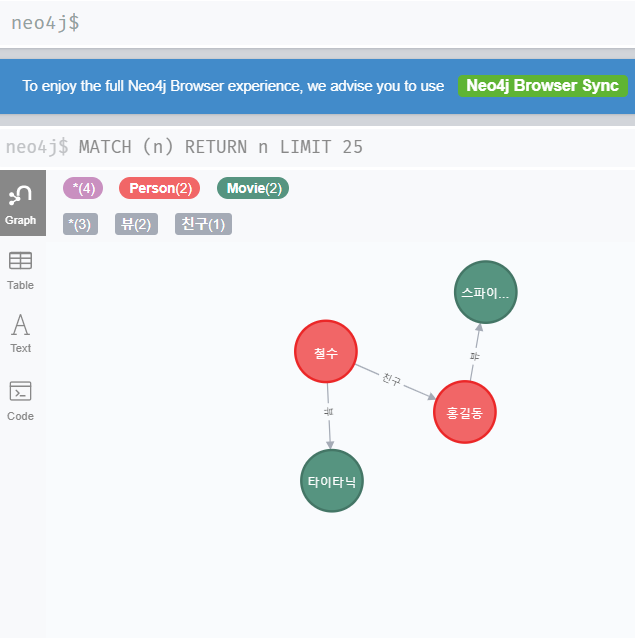
친구가본 영화를 추천하는 간단한 그래프 모델이며 브라우져를 통해 연관성이 시각화를 통해 표현됩니다.
이벤트 처리기를 성능가이드 Tip 시대의 흐름에 따라, 성능을 위한 개발제약은 변경될수 있습니다. 패킷최적화를 위해 Byte Order를 고려하던 시절이 있었지만 이제 그럴필요는 없습니다.
|
서비스에서 이벤트가 발생할때마다 Crud를 직접하는것은 서비스의 성능을 느리게할수 있으며, 발생이벤트를 메시징큐에 적재하여
백그라운드에서 순차적으로 또는 분리된 리모트에서 해당이벤트를 처리할수 있습니다. ( AkkaRemote또는 Kafka가 활용될수 있습니다.)
여기서의 샘플은 Actor메시지 로컬메시지큐가 사용되어, 백그라운드에서 블락없이 작동되며 Remote로 확장또는 Kafka로의 연결로 확장할수 있습니다.
namespace App.Actors
{
    public class GraphElementIdenty
    {
        public string Alice { get; set; }

        public string Name { get; set; }
    }

    public class GraphEvent
    {
        public string Action { get; set; } // Create , Relation, Reset

        public string Alice { get; set; } // AliceName

        public string Name { get; set; }

        public GraphElementIdenty From { get; set; }

        public GraphElementIdenty To { get; set; }
    }

    public class GraphEventActor : ReceiveActor
    {
        private readonly ILoggingAdapter logger = Context.GetLogger();
        private readonly GraphEngine graphEngine;

        public GraphEventActor(GraphEngine _graphEngine)
        {
            logger.Info($"Create GraphEventActor:{Context.Self.Path.Name}");
            graphEngine = _graphEngine;

            ReceiveAsync<GraphEvent>(async graphEvent =>
            {
                var cypher = await _graphEngine.GetCypher();

                switch (graphEvent.Action)
                {
                    case "Reset":
                        {
                            await _graphEngine.RemoveAll();
                        }
                        break;
                    case "Create":
                        {
                            await cypher.Write
                                .Create($"(alice:{graphEvent.Alice} {{name:'{graphEvent.Name}'}})")
                                .ExecuteWithoutResultsAsync();
                        }
                        break;
                    case "Relation":
                        {
                            await cypher.Write
                                .Match($"(a:{graphEvent.From.Alice}),(b:{graphEvent.To.Alice})")
                                .Where($"a.name = '{graphEvent.From.Name}' AND b.name = '{graphEvent.To.Name}'")
                                .Create($"(a)-[r:{graphEvent.Name}]->(b)").ExecuteWithoutResultsAsync();
                        }
                        break;
                }
            });
        }
    }
} |
추천데이터 이벤트를 심플하게 발생하는 액터기이며, 로컬작동시에도 서비스를 블락하지 않습니다.
var graphEngine = app.ApplicationServices.GetService<GraphEngine>();

var graphEventActor = AkkaLoad.RegisterActor(
    "GraphEventActor",
    actorSystem.ActorOf(Props.Create<GraphEventActor>(graphEngine),
        "GraphEventActor"
));

//Test For Graph
graphEventActor.Tell(new GraphEvent()
{
    Action = "Reset"
});

// 홍길동 생성
graphEventActor.Tell(new GraphEvent()
{
    Action = "Create",
    Alice = "Person",
    Name = "홍길동"
});

// 스파이더맨 영화생성
graphEventActor.Tell(new GraphEvent()
{
    Action = "Create",
    Alice = "Movie",
    Name = "스파이더맨"
});

// 홍길동은 스파이더맨을 시청하였다.
graphEventActor.Tell(new GraphEvent()
{
    Action = "Relation",
    Name = "시청",
    From = new GraphElementIdenty()
    {
        Alice = "Person",
        Name = "홍길동"
    },
    To = new GraphElementIdenty()
    {
        Alice = "Movie",
        Name = "스파이더맨"
    }
}); |
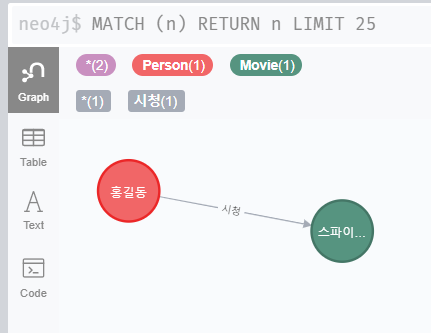
위 샘플이 수행되면, 아래와같은 결과를 확인할수 있습니다.
사용자의 이벤트를 활용하여~ 연관모델을 탐색,추천 모델을 만들때 활용가능
사용된 이벤트 : 쇼아 - https://www.showa.kr/ - 추천 고도화를 위해 GraphDB 적용준비중에 있습니다.
추가참고 링크