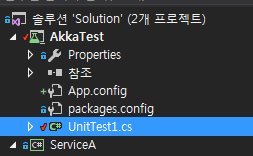
코드 테스트를 하기위해서 다음과 같은 방법이 있습니다.
기호에 맞게 AKKA 테스트 코드를 작성할수 있으나, VisualStudio 유닛테스트기를 권장합니다.
using Akka.Actor;

namespace ServiceA.STUDY
{
    public class ActorTest  //Actor 기본 테스트를 위해서~~
    {
        protected ActorSystem actorSystem;

        public ActorTest(ActorSystem system)  //메인 APP에서 생성한 AKKA System만 참조하면 됩니다.
        {
            actorSystem = system;
        }

        protected void SomeTest1()
        {

        }

        public void RunAll()
        {
            SomeTest1(); //SubTest

        }
    }
} |
이렇게 하는 이유는 단지, 기존 어플리케이션 코드에서 학습 진행한 코드를 섹션별로 분리목적으로 큰 의도는 없습니다.
위와 같은 템플릿은 ActorTest외에 , RemoteActorTest , ClusterActorTest 등 학습 목적에따라 Class로 분리예정이며
생성패턴이 유사하니 추가로 언급하지 않겠습니다.
using Akka.Actor;

using ServiceA.STUDY;

namespace ServiceA
{
    class Program
    {
        static void Main(string[] args)
        {
            ConsoleKeyInfo cki;
            Console.CancelKeyPress += new ConsoleCancelEventHandler(myHandler);
            using (ActorSystem system = ActorSystem.Create("ServiceA"))
            {
                //Actor의 시스템 준비 완료

                //ActorTest -ActorTest코드는 아래 두줄외에 더이상 추가가 안됩니다.
                ActorTest actorTest = new ActorTest(system);
                actorTest.RunAll();

                while (true)
                {
                    // 메인 어플리케이션 종료방지를 위한코드 ( ctrl+x 종료 )
                    cki = Console.ReadKey(true);
                    if (cki.Key == ConsoleKey.X) break;
                }
            }
        }

        protected static void myHandler(object sender, ConsoleCancelEventArgs args)
        {
            args.Cancel = true;
        }
    }
} |
간단한 단위 테스트를 이용할때는, 직접 테스트 클랙스를 작성하여 콘솔환경에서 수행하는것보다
IDE에서 제공하는 유닛 테스트프로젝트를 이용하는것이 더 편리하고 강력합니다.
AKKA의 기본기능을 배우기위해서는, 유닛테스트 템플릿 프로젝트로 충분합니다.
테스트 코드를 서비스 코드와 완전하게 분리할수 있습니다.
서비스코드는 서비스에 필요한 각종 액터,메시지정의가 포함될수 있습니다.
Test프로젝트는 서비스프로젝트를 참조하여, 서비스내에서 정의한 객체들을 참조를통해
테스트 수행 가능합니다.
테스트를 단위혹은 그룹별실행 가능하며, 출력및 유효검사 가능합니다.
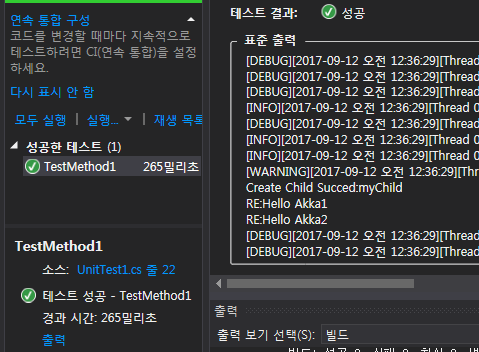
AKKA 유닛테스트 샘플