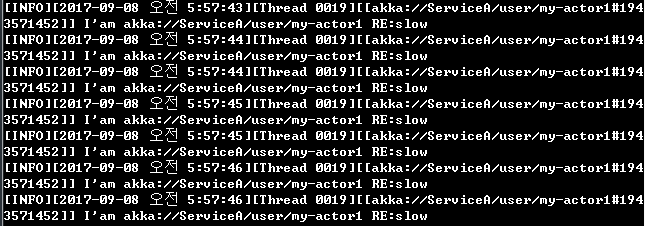
스레드 1개만 사용이 됩니다.
Dispatcher는 ActorSystem 내에서 실행되는 모든 코드를 스케줄링 합니다.
각 Actor의 처리량과 시간 점유율을 조정하여 각자에게 공정한 리소스를 제공합니다.
구성 변경을 하지 않는한 일반적으로 시나리오에 맞게 최적화 된 .Net ThreadPOOL을 사용합니다.
Dispatcher 설정기능을 제공함으로 , Ator 그룹별로 다른 성능목표를 가지고 , 성능전략을 세울수가 있습니다.
Dispatchercustom-dispatcher {
type = Dispatcher
throughput = 100
} |
.NET ThreadPool 을 통해 작동이되며 대부분의 경우 이것만으로 충분합니다.
custom-task-dispatcher {
    type = TaskDispatcher
    throughput = 100
} |
TPL 인프라를 사용합니다. ThreadPool과 유사하지만 병렬처리 Thread를 사용해야하는
특수한 케이스일때 사용합니다.
PinnedDispatchercustom-dedicated-dispatcher {
type = PinnedDispatcher
} |
단일 전용 스레드만 사용합니다.
            my-dispatcher {
              type = ForkJoinDispatcher
              throughput = 100
              throughput-deadline-time = 0ms
              dedicated-thread-pool {
                thread-count = 3
                deadlock-timeout = 3s
                threadtype = background
              }
} |
나머지 Dispatcher는 최적화된 각자의 스레드풀이 있습니다.
ForJoinDispatcher의 경우 전용 스레드풀을 사용하며, 이 스 케줄러를 이용할시
나머지 시스템에서 일부 액터를 분리할수가 있습니다.
SynchronizedDispatchersynchronized-dispatcher {
type = "SynchronizedDispatcher"
throughput = 10
}
private void Form1_Load(object sender, System.EventArgs e)
{
system.ActorOf(Props.Create<UIWorker>().WithDispatcher("synchronized-dispatcher"), "ui-worker");
}
|
SynchronizedDispatcher는 SynchronizationContext 를 사용하며 Actor가 UI를 업데이트를 한다고하면UI를 업데이트할수있는 전용 Dispatcher 입니다.
    public class ReActor : ReceiveActor
    {
        private ILoggingAdapter log = Context.GetLogger();

        public ReActor()
        {
            Receive<string>(message => {

                if(message == "slow")  //slow메시지를 받으면, 지연시킵니다.(테스트 지연코드)
                {
                    Task.Delay(500).Wait();
                }

                string reply = string.Format("I'am {0} RE:{1}", Self.Path, message);
                log.Info(reply);
                Sender.Tell(reply);
            });
        }
} |
            var actor1 = actorSystem.ActorOf(Props.Create<ReActor>().WithDispatcher("my-dispatcher"), "my-actor1");
            var actor2 = actorSystem.ActorOf(Props.Create<ReActor>().WithDispatcher("my-dispatcher"), "my-actor2");
            var actor3 = actorSystem.ActorOf(Props.Create<ReActor>().WithDispatcher("my-dispatcher"), "my-actor3");

            for (int i=0; i < 100; i++)
            {
                actor1.Tell("slow");
                actor2.Tell("slow");
                actor3.Tell("slow");
            }

Console.WriteLine("completed - send all"); |
Akka의 로그는 기본적으로 고유 스레드 아이디를 표시해줍니다.
스레드 1개만 사용이 됩니다. |
스레드 3개를 번갈아가며 사용합니다. |
대부분 사용할일이 없지만, 어떠한 액터가 메시지를 받으면 블락킹이되고 오래걸리는경우 (일반적으로 외부 RestAPI)
이와같은 전력을 통해 스레드수분리가 가능합니다. ( 기본 메시지처리기에 부하를 분리)
RestAPI를 대신하여 호출해주는 Actor 설계시 다음과 같은 조건을 가집니다.
C#의 비동기 프로그래밍의 힘을 빌려 Task에 완료된 비동기처리를 Pipe로 연결하여
결과가 완료되면, 완료 처리를 하게 합니다.
    public class DelayReply
    {
        public string message;
    }

    public class ReActor : ReceiveActor
    {
        private ILoggingAdapter log = Context.GetLogger();

        public ReActor()
        {
            string myPath = Self.Path.ToString();

            Receive<string>(message => {
                Handle(message);
            });

            Receive<DelayReply>(message => {
                Handle(message);
            });
        }

        public void Handle(string str)      //InMessage
        {
            Task.Run(async () =>
            {
                await Task.Delay(1000); //어떠한 값을 기다림
                DelayReply reply = new DelayReply();
                reply.message = str;
                return reply;
            }).PipeTo(Self);
        }

        public void Handle(DelayReply data) //Out
        {
            string logtrace = string.Format("I'am {0} RE:{1}", Self.Path, data.message);
            log.Info(data.message);
            Sender.Tell(data);
        }

} |
