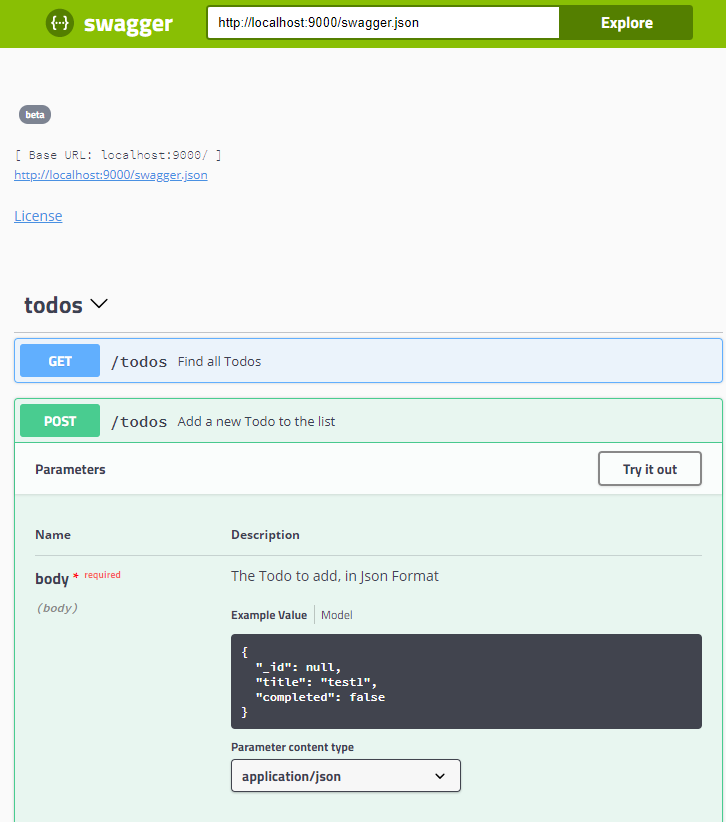
몽고 DB의 저장소를 CRUD를 API화 하는 방법과 그것을 Swagger를통해 문서자동화를 하여 웹 인터페이스에서 NoSQL의 저장소를 CRUD를 해보는것을 실습해보겠습니다. src : |
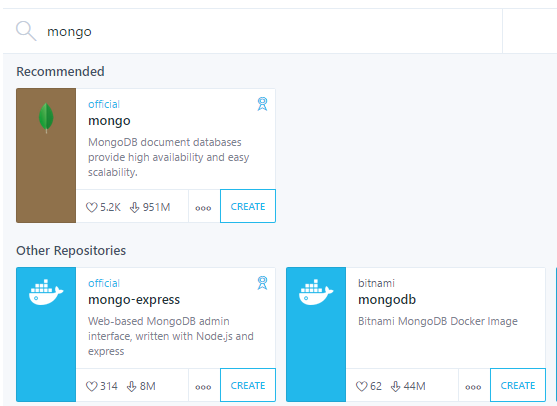
직접 설치하거나, 도커를 이용한 방법 두가지가 있습니다.
https://docs.mongodb.com/v3.2/tutorial/install-mongodb-on-ubuntu/
https://docs.docker.com/kitematic/
|
|
|---|
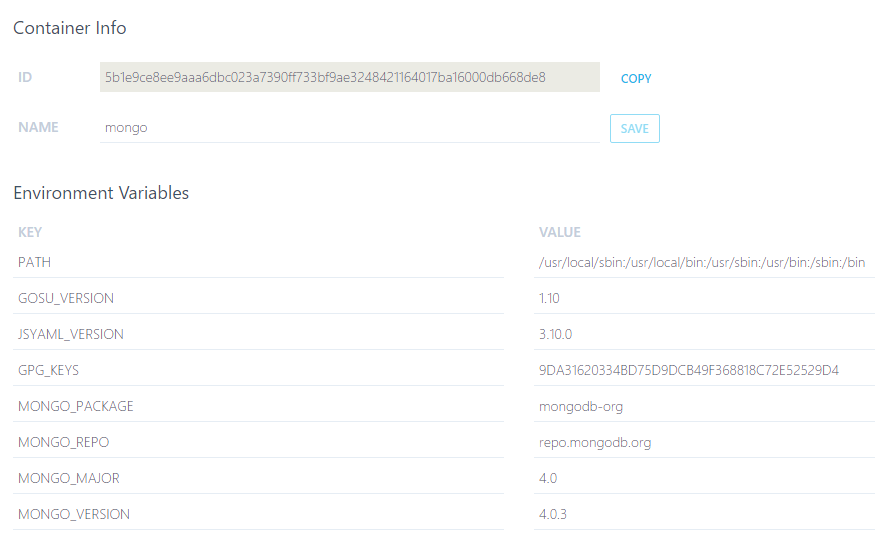
자신의 개발 환경에 도커+Kinematic이 설치가 되어있다고 하면 설치가 각각 다른 오픈 프로젝트 서비스를 원클릭으로 이용할수가 있다.
이것은 설치에대한 고통을 줄이고 여러가지 DB에대한 학습 시간을 비약적으로 단축시킬수가 있습니다.
메이븐의 라이브러리 디펜던시에 해당하는 부분으로, SBT는 더 심플하게
의존 라이브러리를 표현합니다.
val reactiveMongoVer = "0.16.0-play26" // mongo + swagger libraryDependencies ++= Seq( "org.reactivemongo" %% "play2-reactivemongo" % reactiveMongoVer, "io.swagger" %% "swagger-play2" % "1.6.0", "org.webjars" % "swagger-ui" % "3.2.2", ) |
spring boot과 비교하자면, application.propertis에 해당하는 설정화부분으로
몽고 db와 swagger사용을 위해 아래와같은 설정이 필요합니다.
play.modules {
  # By default, Play will load any class called Module that is defined
  # in the root package (the "app" directory), or you can define them
  # explicitly below.
  # If there are any built-in modules that you want to enable, you can list them here.
  #enabled += my.application.Module
  enabled += "play.modules.reactivemongo.ReactiveMongoModule"
  enabled += "play.modules.swagger.SwaggerModule"

  # If there are any built-in modules that you want to disable, you can list them here.
  #disabled += ""
}
swagger.api.uri = "http://localhost:9000"
mongodb.uri = "mongodb://localhost:32774/todo-app" |
playframework의 특징중하나로, 웹주소에 관련한 endpoin설정이 코드와 분리되어 기본으로 설정화가 되어있습니다.
# Routes # This file defines all application routes (Higher priority routes first) # ~~~~ GET /todos controllers.TodoController.getAllTodos GET /todos/:id controllers.TodoController.getTodo(id: reactivemongo.bson.BSONObjectID) + nocsrf POST /todos controllers.TodoController.createTodo + nocsrf PATCH /todos/:id controllers.TodoController.updateTodo(id: reactivemongo.bson.BSONObjectID) + nocsrf DELETE /todos/:id controllers.TodoController.deleteTodo(id: reactivemongo.bson.BSONObjectID) # Swagger docs GET / controllers.ApiDocsController.redirectToDocs GET /swagger.json controllers.ApiHelpController.getResources GET /api-docs controllers.ApiDocsController.redirectToDocs |
Todo Model을 CRUD하는 Repository를 아래와같이 구현합니다.
case class Todo(_id: Option[BSONObjectID], title: String, completed: Option[Boolean])

object JsonFormats{
  import play.api.libs.json._

  implicit val todoFormat: OFormat[Todo] = Json.format[Todo]
}

class TodoRepository @Inject()(implicit ec: ExecutionContext, reactiveMongoApi: ReactiveMongoApi){

  import JsonFormats._

  def todosCollection: Future[JSONCollection] = reactiveMongoApi.database.map(_.collection("todos"))

  def getAll(limit: Int = 100): Future[Seq[Todo]] =
    todosCollection.flatMap(_.find(
      selector = Json.obj(/* Using Play JSON */),
      projection = Option.empty[JsObject])
      .cursor[Todo](ReadPreference.primary)
      .collect[Seq](limit, Cursor.FailOnError[Seq[Todo]]())
    )

  def getTodo(id: BSONObjectID): Future[Option[Todo]] =
    todosCollection.flatMap(_.find(
      selector = BSONDocument("_id" -> id),
      projection = Option.empty[BSONDocument])
      .one[Todo])

  def addTodo(todo: Todo): Future[WriteResult] =
    todosCollection.flatMap(_.insert(todo))

  def updateTodo(id: BSONObjectID, todo: Todo): Future[Option[Todo]] = {
    val selector = BSONDocument("_id" -> id)
    val updateModifier = BSONDocument(
      f"$$set" -> BSONDocument(
        "title" -> todo.title,
        "completed" -> todo.completed)
    )

    todosCollection.flatMap(
      _.findAndUpdate(selector, updateModifier, fetchNewObject = true)
        .map(_.result[Todo])
    )
  }

  def deleteTodo(id: BSONObjectID): Future[Option[Todo]] = {
    val selector = BSONDocument("_id" -> id)
    todosCollection.flatMap(_.findAndRemove(selector).map(_.result[Todo]))
  }

} |
문서화 페이지 컨트롤러는 이 코드면 충분하며, 나머지는 실제 서비스 컨트롤러에
어노테이션이 셋팅되어 API문서 자동화가 됩니다.
class ApiDocsController @Inject()(cc: ControllerComponents, configuration: Configuration) extends AbstractController(cc) {

  def redirectToDocs = Action {
    val basePath = configuration.underlying.getString("swagger.api.uri")
    Redirect(
      url = "/assets/lib/swagger-ui/index.html",
      queryString = Map("url" -> Seq(s"$basePath/swagger.json"))
    )
  }
} |
TodoRepository를 이용하는 Controller코드를 작성합니다.
API어노테이션으로 최종 Endpoint및 작동방식들이 결정되면서 Swagger의 문서화와 자동 연동이됩니다.
@Api(value = "/todos")
class TodoController @Inject()(cc: ControllerComponents, todoRepo: TodoRepository) extends AbstractController(cc) {

  @ApiOperation(
    value = "Find all Todos",
    response = classOf[Todo],
    responseContainer = "List"
  )
  def getAllTodos = Action.async {
    todoRepo.getAll().map { todos =>
      Ok(Json.toJson(todos))
    }
  }


  @ApiOperation(
    value = "Get a Todo",
    response = classOf[Todo]
  )
  @ApiResponses(Array(
      new ApiResponse(code = 404, message = "Todo not found")
    )
  )
  def getTodo(@ApiParam(value = "The id of the Todo to fetch") todoId: BSONObjectID) = Action.async {
    todoRepo.getTodo(todoId).map { maybeTodo =>
      maybeTodo.map { todo =>
        Ok(Json.toJson(todo))
      }.getOrElse(NotFound)
    }
  }

  @ApiOperation(
    value = "Add a new Todo to the list",
    response = classOf[Void],
    code = 201
  )
  @ApiResponses(Array(
      new ApiResponse(code = 400, message = "Invalid Todo format")
    )
  )
  @ApiImplicitParams(Array(
      new ApiImplicitParam(value = "The Todo to add, in Json Format", required = true, dataType = "models.Todo", paramType = "body")
    )
  )
  def createTodo() = Action.async(parse.json) {
    _.body.validate[Todo].map { todo =>
      todoRepo.addTodo(todo).map { _ =>
        Created
      }
    }.getOrElse(Future.successful(BadRequest("Invalid Todo format")))
  }

  @ApiOperation(
    value = "Update a Todo",
    response = classOf[Todo]
  )
  @ApiResponses(Array(
      new ApiResponse(code = 400, message = "Invalid Todo format")
    )
  )
  @ApiImplicitParams(Array(
      new ApiImplicitParam(value = "The updated Todo, in Json Format", required = true, dataType = "models.Todo", paramType = "body")
    )
  )
  def updateTodo(@ApiParam(value = "The id of the Todo to update")
                 todoId: BSONObjectID) = Action.async(parse.json){ req =>
    req.body.validate[Todo].map { todo =>
      todoRepo.updateTodo(todoId, todo).map {
        case Some(todo) => Ok(Json.toJson(todo))
        case _ => NotFound
      }
    }.getOrElse(Future.successful(BadRequest("Invalid Json")))
  }

  @ApiOperation(
    value = "Delete a Todo",
    response = classOf[Todo]
  )
  def deleteTodo(@ApiParam(value = "The id of the Todo to delete") todoId: BSONObjectID) = Action.async { req =>
    todoRepo.deleteTodo(todoId).map {
      case Some(todo) => Ok(Json.toJson(todo))
      case _ => NotFound
    }
  }
} |
NOSQL 기반의 DB에 우리가 원하는 모델을 정의하고
API화하여 웹인터페이스를 활용하여 테스트할수 있는 방법을 이용할수가 있습니다.
|
|
|---|
유닛테스트는 덤으로 알아보자..
trait PlayWithMongoSpec extends PlaySpec with GuiceOneAppPerSuite {
  override def fakeApplication = new GuiceApplicationBuilder()
    .configure(
      "mongodb.uri" -> "mongodb://localhost:32774/todos-test"
    )
    .build()
  lazy val reactiveMongoApi = app.injector.instanceOf[ReactiveMongoApi]
} |
class TodoIntegrationSpec extends PlayWithMongoSpec with BeforeAndAfter {

  var todos: Future[JSONCollection] = _

  before {
    //Init DB
    await {
      todos = reactiveMongoApi.database.map(_.collection("todos"))

      todos.flatMap(_.insert[Todo](ordered = false).many(List(
        Todo(_id = None, title = "Test todo 1", completed = Some(false)),
        Todo(_id = None, title = "Test todo 2", completed = Some(true)),
        Todo(_id = None, title = "Test todo 3", completed = Some(false)),
        Todo(_id = None, title = "Test todo 4", completed = Some(true))
      )))
    }
  }

  after {
    //clean DB
    todos.flatMap(_.drop(failIfNotFound = false))
  }


  "Get all Todos" in {
    val Some(result) = route(app, FakeRequest(GET, "/todos"))
    val resultList = contentAsJson(result).as[List[Todo]]
    resultList.length mustEqual 4
    status(result) mustBe OK
  }

  "Add a Todo" in {
    val payload = Todo(_id = None, title = "Test newly added todo", completed = Some(true))
    val Some(result) = route(app, FakeRequest(POST, "/todos").withJsonBody(Json.toJson(payload)))
    status(result) mustBe CREATED
  }

  "Delete a Todo"  in {
    val query = BSONDocument()
    val Some(todoToDelete) = await(todos.flatMap(
      _.find(query, Option.empty[JsObject]).one[Todo]))

    val todoIdToDelete = todoToDelete._id.get.stringify
    val Some(result) = route(app, FakeRequest(DELETE, s"/todos/$todoIdToDelete"))
    status(result) mustBe OK
  }

  "Update a Todo" in {
    val query = BSONDocument()
    val payload = Json.obj(
      "title" -> "Todo updated"
    )
    val Some(todoToUpdate) = await(todos.flatMap(
      _.find(query, Option.empty[BSONDocument]).one[Todo]))

    val todoIdToUpdate = todoToUpdate._id.get.stringify
    val Some(result) = route(app, FakeRequest(PATCH, s"/todos/$todoIdToUpdate").withJsonBody(payload))
    val updatedTodo = contentAsJson(result).as[Todo]
    updatedTodo.title mustEqual "Todo updated"
    status(result) mustBe OK
  }

} |
Junit과 유사하게 Scala Test(Spec) 도 test하위에 집결됩니다. |
OR
OR
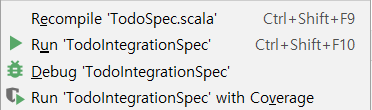
소스에서 우클릭 하여 TestSpec 수행 |
|---|
스칼라 프로젝트의 UnitTest를 실행하는 명령어는 , sbt run (프로젝트디렉토리) 이며
IDE에서는 위와같이 sbtTask또는 ScalaTest를 추가하여 IDE에서 관리할수가 있습니다.
[info] ScalaTest [info] Run completed in 21 seconds, 483 milliseconds. [info] Total number of tests run: 6 [info] Suites: completed 2, aborted 0 [info] Tests: succeeded 6, failed 0, canceled 0, ignored 0, pending 0 [info] All tests passed. [info] Passed: Total 6, Failed 0, Errors 0, Passed 6 [success] Total time: 26 s, completed 2018. 10. 29 오전 1:14:30 |