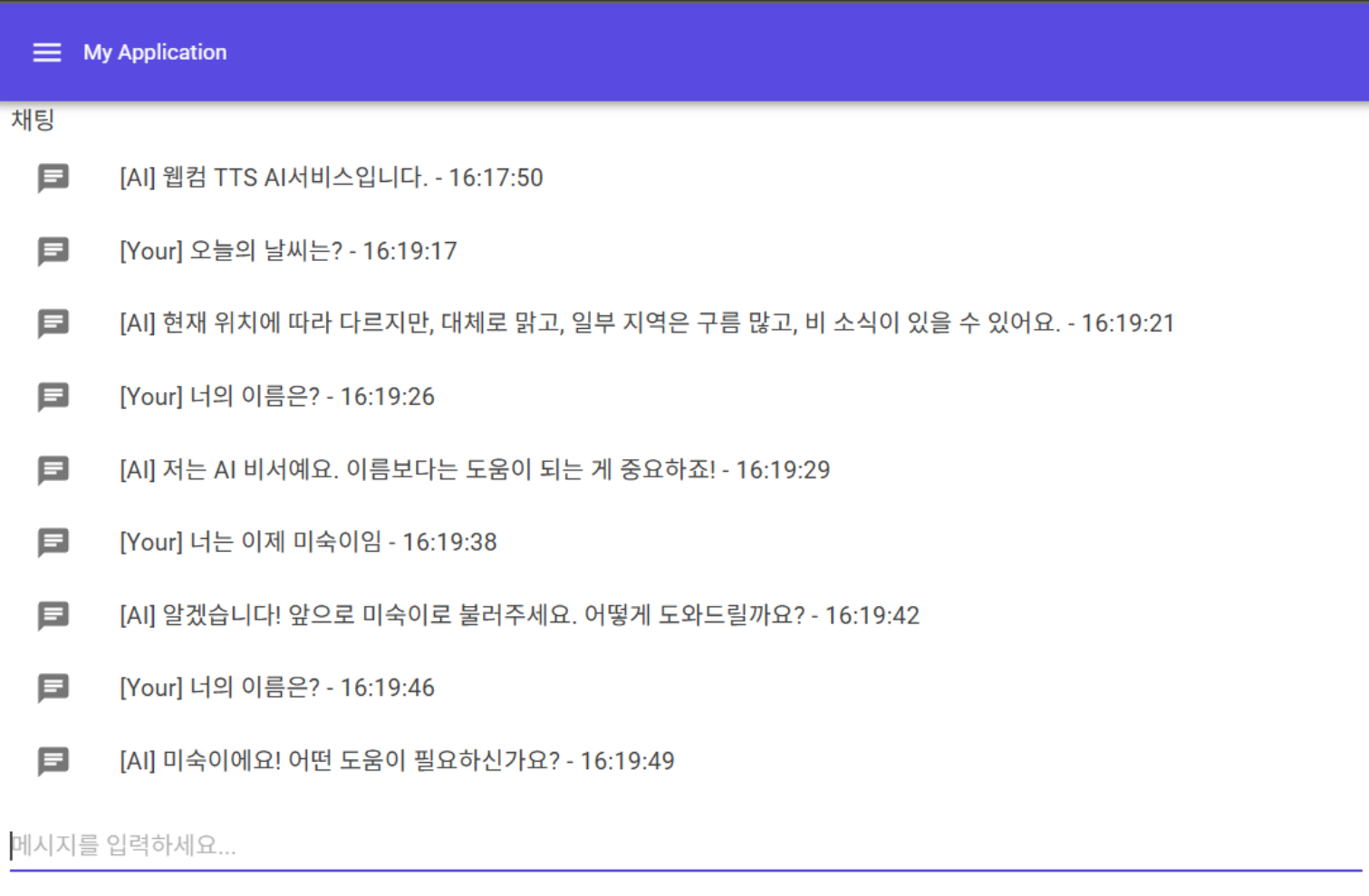
텍스트를 입력하면 음성으로 변환해 출력하고~ LLM AI응답도 음성으로 출력해 AI와 음성대화를 하는 심플음성채팅을 OPENAPI를 이용해 작동되는 데모로
Blazor의 특성과 액터모델의 장점을 이용해 더 강력한 커스텀화된 RealTime AI기능을 만들수 있습니다.
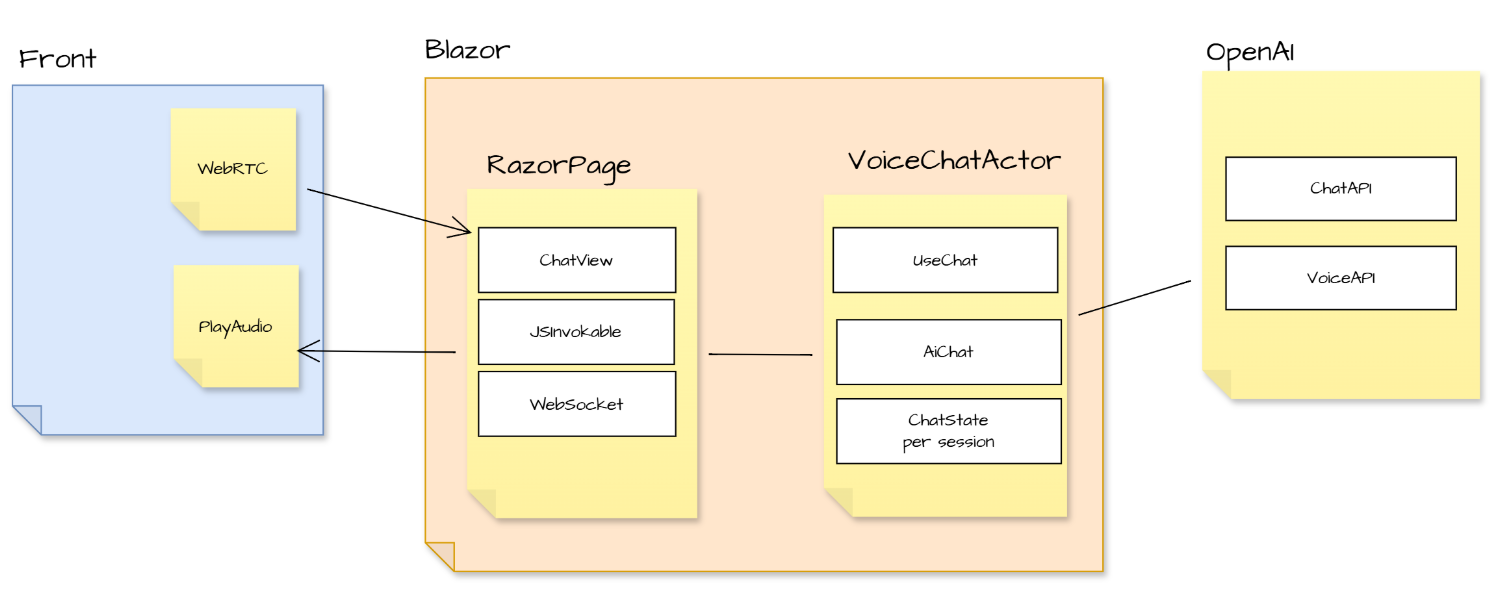
핵심구현코드를 간단하게 살펴보겠습니다.
_ = Task.Run(() => GetChatCompletion(command.Text));
var recVoice = _openAIService.ConvertTextToVoiceAsync(command.Text, command.Voice).Result;
_blazorCallback?.Invoke("AddMessage", new object[] { command.From, command.Text });
_blazorCallback?.Invoke("PlayAudioBytes", new object[] { recVoice, 0.5f, playType }); |
public async Task<string> GetChatCompletion(string message, List<string> assist)
{
    var completionResult = await _client.CompleteChatAsync(new ChatMessage[]
    {
        ChatMessage.CreateUserMessage(message),
        ChatMessage.CreateAssistantMessage(string.Join("\n", assist))
    });
    string aiResponse = completionResult.Value.Content.FirstOrDefault()?.Text ?? string.Empty;

    return aiResponse;
}


/// <summary>
/// voice alloy, ash, ballad, coral, echo, fable, onyx, nova, sage, , shimme
/// </summary>
/// <param name="text"></param>
/// <param name="voice"></param>
/// <returns></returns>
/// <exception cref="InvalidOperationException"></exception>
public async Task<float[]> ConvertTextToVoiceAsync(string text, string voice = "alloy")
{
    var requestBody = new
    {
        model = "gpt-4o-mini-tts",  // TTS 모델 이름
        input = text,               // 변환할 텍스트
        voice                       // 음성 스타일
    };

    var ttsTask = _httpClient.PostAsJsonAsync("audio/speech", requestBody);

    await Task.WhenAll(ttsTask); // 두 작업이 완료될 때까지 기다림

    var response = await ttsTask;

    if (!response.IsSuccessStatusCode)
    {
        throw new InvalidOperationException($"TTS API 호출 실패: {response.ReasonPhrase}");
    }

    // MP3 데이터를 byte 배열로 변환하여 반환
    var audioBytes = await response.Content.ReadAsByteArrayAsync();

    // MP3 데이터를 PCM 데이터로 변환
    return ConvertMp3ToFloatArray(audioBytes);
} |
private float[] ConvertMp3ToFloatArray(byte[] mp3Data)
{
    using var mp3Stream = new MemoryStream(mp3Data);
    using var mp3Reader = new Mp3FileReader(mp3Stream);

    // PCM 데이터를 float 배열로 변환
    var sampleProvider = mp3Reader.ToSampleProvider();
    var totalSamples = (int)(mp3Reader.TotalTime.TotalSeconds * mp3Reader.WaveFormat.SampleRate * mp3Reader.WaveFormat.Channels);
    var floatBuffer = new float[totalSamples];
    int samplesRead = sampleProvider.Read(floatBuffer, 0, floatBuffer.Length);

    return floatBuffer.Take(samplesRead).ToArray();
} |
async function playAudioBytes(audioBytes, playbackRate, type, dotNetRef) {
    try {
        if (!audioContext || audioContext.state === 'closed') {
            audioContext = new AudioContext();
        }

        // Float32Array로 변환된 PCM 데이터 사용
        const float32Array = new Float32Array(audioBytes);

        // AudioBuffer 생성
        const audioBuffer = audioContext.createBuffer(1, float32Array.length, audioContext.sampleRate);
        audioBuffer.copyToChannel(float32Array, 0);

        // 재생
        const bufferSource = audioContext.createBufferSource();
        bufferSource.buffer = audioBuffer;
        bufferSource.playbackRate.value = playbackRate; // 재생 속도 설정
        bufferSource.connect(audioContext.destination);

        // 재생 완료 이벤트 핸들러 추가
        bufferSource.onended = () => {
            // 타입에 따라 추가 작업 수행
            console.log(`오디오 재생 완료 재생 타입: ${type}`);
            if (type === 1) {
                console.log("Type 1: 휴먼요청 재생완료~ LLM응답재생 요청");
                if (dotNetRef && typeof dotNetRef.invokeMethodAsync === "function") {
                    dotNetRef.invokeMethodAsync("OnAudioPlaybackCompleted", 1)
                        .catch(err => console.error("Blazor 메서드 호출 OnAudioPlaybackCompleted 중 오류 발생:", err));
                }
            } else if (type === 2) {
                console.log("Type 2: AI재생완료");
            } else if (type === 3) {
                console.log("Type 3: 사용자 정의 작업");
            }
        };

        bufferSource.start();
    } catch (err) {
        console.error("오디오 재생 중 오류 발생:", err);
    }
} |
<PageTitle>WebRTC</PageTitle>
<h1>WebRTC</h1>
    <!-- 채팅창 -->
    <MudItem xs="12">
        <MudPaper Class="pa-3">
            <MudButton OnClick="StartWebRTC" Class="mt-4">
                Start WebRTC
            </MudButton>
        </MudPaper>
        <MudPaper Class="pa-3">
            <MudText Typo="Typo.subtitle1">채팅</MudText>
            <MudStack>
                <!-- 채팅 리스트 -->
                <MudList T="string">
                    @foreach (var chat in ChatMessages)
                    {
                        <MudListItem Text="@chat" Icon="@Icons.Material.Filled.Chat" />
                    }
                </MudList>
                <!-- 채팅 입력 -->
                <MudTextField @bind-Value="ChatInput" Placeholder="메시지를 입력하세요..." />
                <MudButton OnClick="SendChatMessage" Class="mt-2">전송</MudButton>
            </MudStack>
        </MudPaper>
    </MudItem>
@code {
    [JSInvokable]
    public async Task OnAudioPlaybackCompleted(int option)
    {
      MyVoiceActor.Tell(new TTSCommand()
      {
      From = "AI",
      Text = "LLM자동재생",
      Voice = "alloy"
      });
    }

    private void PlayAudioBytes(float[] voice, float speed, int playtype)
    {
      InvokeAsync(() =>
      {
      var dotNetRef = DotNetObjectReference.Create(this);
      JSRuntime.InvokeVoidAsync("playAudioBytes", voice, speed, playtype, dotNetRef);
      });
    }
} |
public class VoiceChatActor : ReceiveActor, IWithTimers
{
    private List<String> _conversationHistory = new();

    private string lastAiMessage = string.Empty;

    private Action<string, object[]> _blazorCallback;

    private OpenAIService _openAIService;

    private int MaxAIWordCount = 100; // AI 응답 최대 단어 수 설정

    private sealed class TimerKey
    {
        public static readonly TimerKey Instance = new();
        private TimerKey() { }
    }

    public int RefreshTimeSecForContentAutoUpdate { get; set; } = 30;

    public ITimerScheduler Timers { get; set; } = null!;

    public VoiceChatActor(IServiceProvider serviceProvider)
    {
        logger.Info($"VoiceChatActor : Constructor - {Self.Path}");

        _openAIService = new OpenAIService();

        // 액터별 반복스케줄러 기능을 가져~ 응답이 아닌 능동형기능에 이용될수 있습니다.
        Timers.StartPeriodicTimer(
            key: TimerKey.Instance,
            msg: new ContentAutoUpdateCommand(),
            initialDelay: TimeSpan.FromSeconds(10),
            interval: TimeSpan.FromSeconds(RefreshTimeSecForContentAutoUpdate));

        Receive<ContentAutoUpdateCommand>( command =>
        {
            logger.Info("VoiceChatActor : ContentAutoUpdateCommand");
        });

        Receive<TTSCommand>( command =>
        {
            logger.Info($"VoiceChatActor : Received Command - {command.GetType().Name}");
            switch (command.From)
            {
                case "Your":
                {
                    int playType = 1;
                    _ = Task.Run(() => GetChatCompletion(command.Text));
                    var recVoice = _openAIService.ConvertTextToVoiceAsync(command.Text, command.Voice).Result;
                    _blazorCallback?.Invoke("AddMessage", new object[] { command.From, command.Text });
                    _blazorCallback?.Invoke("PlayAudioBytes", new object[] { recVoice, 0.5f, playType });
                }
                break;
                case "AI":
                {
                    var msg = lastAiMessage;
                    int playType = 2;
                    var recVoice = _openAIService.ConvertTextToVoiceAsync(msg, command.Voice).Result;
                    _blazorCallback?.Invoke("AddMessage", new object[] { command.From, msg });
                    _blazorCallback?.Invoke("PlayAudioBytes", new object[] { recVoice, 0.5f, playType });
                }
                break;
                default:
                    logger.Warning($"Unknown command received: {command.From}");
                break;
            }
        });
    }

    /// <summary>
    /// 주어진 메시지에 대한 ChatCompletion을 생성합니다.
    /// </summary>
    /// <param name="message">보낼 메시지</param>
    /// <returns>ChatCompletion 결과</returns>
    public async Task<string> GetChatCompletion(string message)
    {
        _conversationHistory.Add($"User:{message}");

        // 최근 20개의 대화 기록을 가져옵니다.
        var recentHistory = _conversationHistory.Skip(Math.Max(0, _conversationHistory.Count - 20)).ToList();

        // 수정된 코드: ChatMessage 생성 시 올바른 정적 메서드 사용
        var aiResponse = await _openAIService.GetChatCompletion(

            $"요청메시지는 : {message} 이며 첨부메시지는 현재 대화내용의 히스토리이며 이 맥락을 유지하면서 답변, 답변은 {MaxAIWordCount}자미만으로 줄여서 답변을 항상해~ AI는 너가답변한것이니 언급없이 너인것처럼하면됨",
            recentHistory
        );

        _conversationHistory.Add($"AI:{aiResponse}");
        lastAiMessage = aiResponse;

        return aiResponse;
    }
} |