
메타메타 해서, 제작해봄~
Blazor를 이용하여~ 그래픽 웹챗을 구현하는 변종 실험입니다.
GIT : https://github.com/psmon/BlazorChatApp
작동버전 : https://sam.webnori.com/metaroom - git에서 추가커스텀
구현기능
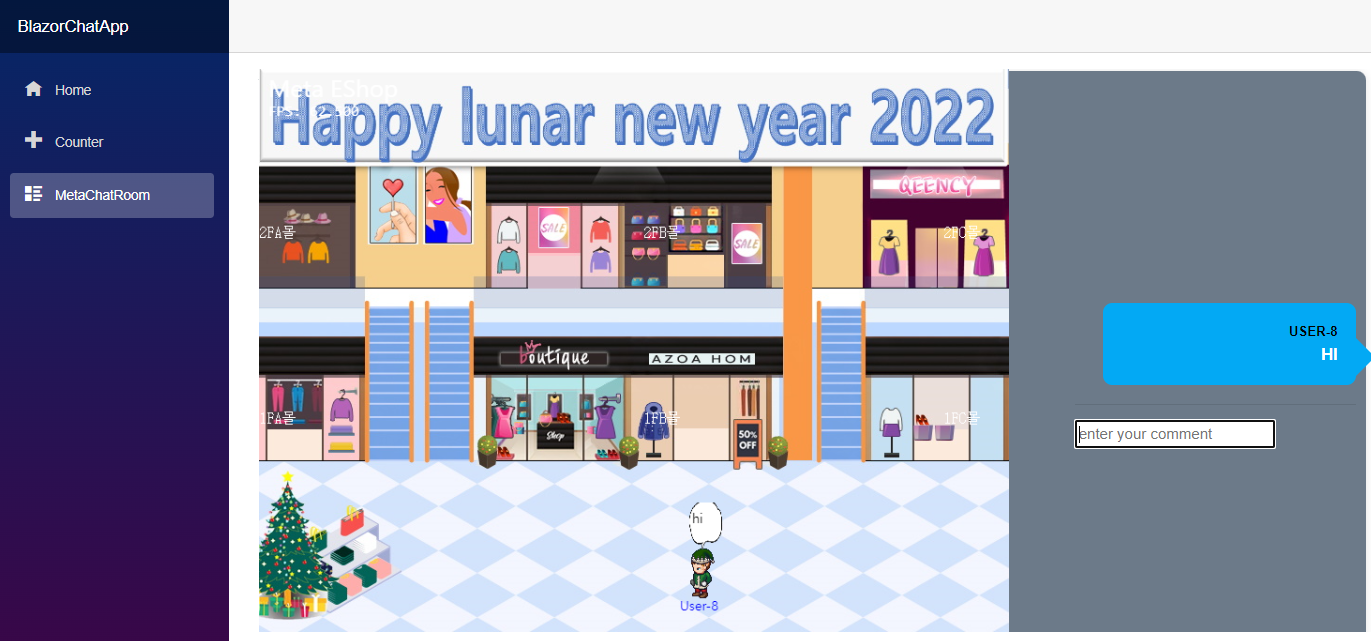
- 입장을 하면, 자신의 캐릭터(도형)가 랜덤생성됩니다.
- 여러사용자가 입장가능하며, 자신의 캐릭터를 움직일수 있습니다.
- 모든 사용자의 위치는 동기화가됩니다.
확장가능
기본 프로젝트를 활용, 캐릭터애니메이션등적용및 다양한 분야에 적용할수 있습니다.
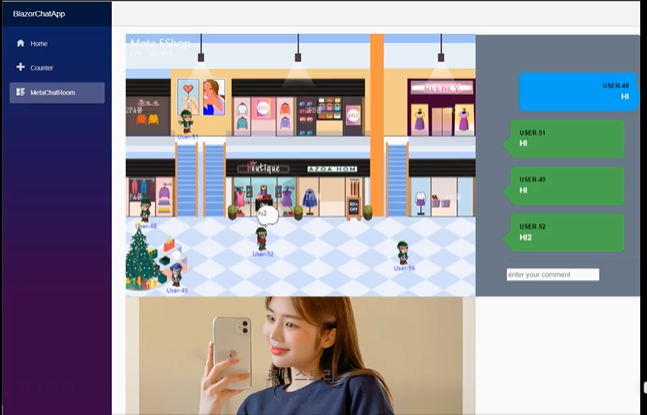
패션문화의 거리 : 루나소프트 패션앱 쇼아입점 상품이 활용되었습니다.
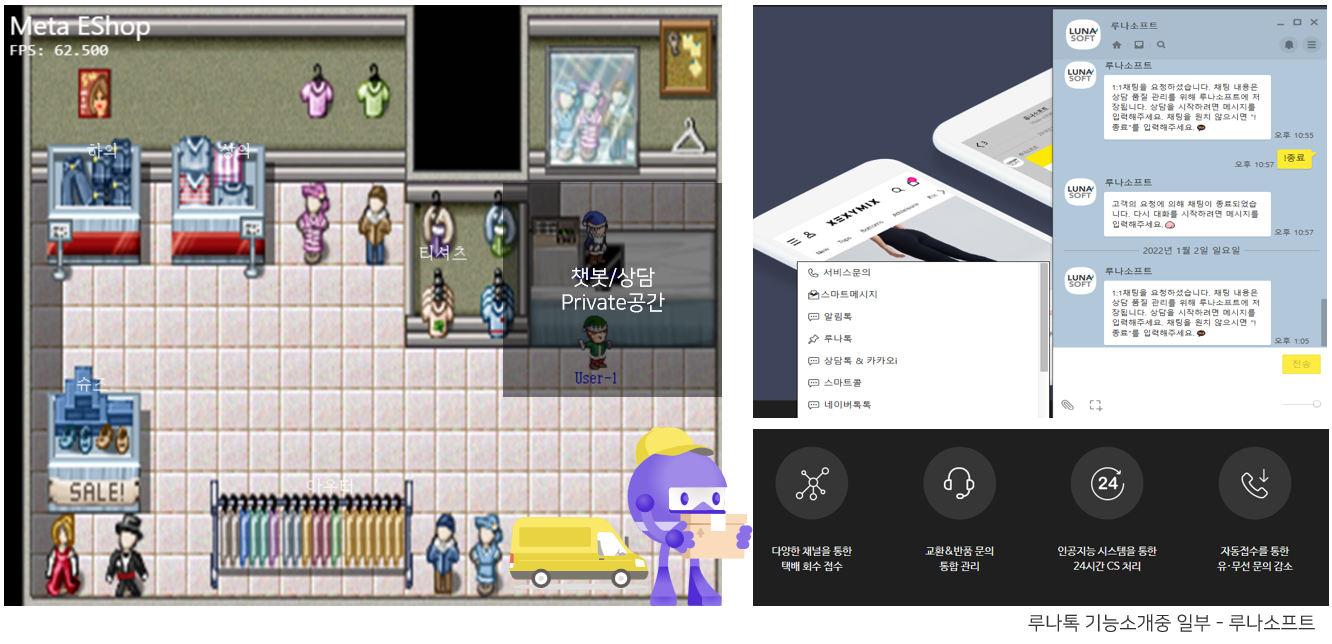
상담메타 : 상담 CS기능 확장 ( 챗봇을 통해 택배 반품접수가 가능한 루나톡~)
추가 구현예정:
- 인증및 채널관리 ( 인증없음~)
- 웹소켓 메시지 사용자 타켓및 채널타켓 ( 브로드 캐스트 사용)
- 기본 채팅기능
- 맵디자인~
실행 샘플

실행샘플2 - 캐틱터 애니메이션 적용
메시지 설계
웹소켓(브라우져)와 서버메시지(액터)의 정의를 C#오브젝트로 통합할수 있습니다. - 블레이즈 특성
namespace BlazorChatApp.Shared
{
    public class ChatData
    {
    }

    public class UserInfo
    {
        public string Id { get; set; }
        public string Name { get; set; }

        public string Color { get; set; }
    }

    public class RoomInfo
    {
        public string Id { get; set; }
        public string Name { get; set; }
    }

    public class UpdateUserPos :UserInfo
    {
        public double PosX{get; set; }
        public double PosY{get; set; }

    }


    public class ChatMessage
    {
        public UserInfo From { get; set; }
        public string Message { get; set; }
    }

    public class JoinRoom
    {
        public RoomInfo RoomInfo { get; set; }
        public UserInfo UserInfo { get; set; }
    }

    public class SyncRoom
    {
        public RoomInfo RoomInfo { get; set; }
        public UserInfo UserInfo { get; set; }
    }

    public class LeaveRoom
    {
        public RoomInfo RoomInfo { get; set; }
        public UserInfo UserInfo { get; set; }
    }


    public class BaseCmd
    {
        public string Command {get;set; }
    }


    public class RoomCmd : BaseCmd
    {
        public UserInfo UserInfo{ get; set; }
        public object Data{get;set; }
    }

}
웹소켓 처리코드
시그널 R이 이용되었으며, 일부 서버에서 상태처리를 해야하는경우 액터를 연결하여 분산처리가능한 서버기능으로 확장할수 있습니다.
- Cilent To Server : 브라우저에서 출발한 메시지를 서버에 전송합니다.
- Server To Client : 서버에서 연산된 메시지를, 브라우저에게 전송합니다.
using System.Collections.Generic;
using System.Threading.Tasks;

using Akka.Actor;

using BlazorChatApp.Shared;

using Microsoft.AspNetCore.SignalR;

namespace BlazorChatApp.Server.Hubs
{
    public class ChatHub : Hub
    {
        private ActorSystem actorSystem;

        private ActorSelection roomActor;

        public ChatHub(ActorSystem _actorSystem)
        {
            actorSystem = _actorSystem;
            roomActor = actorSystem.ActorSelection("user/room1");
        }


        // Client To Server

        public async Task JoInRoom(JoinRoom joinRoom)
        {
            roomActor.Tell(joinRoom);
        }

        public async Task SyncRoom(SyncRoom syncRoom)
        {
            roomActor.Tell(syncRoom);
        }

        public async Task LeaveRoom(LeaveRoom leaveRoom)
        {
            roomActor.Tell(leaveRoom);
        }

        public async Task UpdateUserPos(UpdateUserPos updateUserPos)
        {
            roomActor.Tell(updateUserPos);
        }

        // Server To Client : RoomActor 의 Hub Context를 통해 전송을할수 있습니다.


    }
}
서버코드
웹소켓 이벤트가 주로 브라우저에서 발생하는 이벤트를 처리하면
서버내에서 처리해야하는 로직의 경우 액터를 활용하는것이 유연할수 있습니다.
여기서는 접속한 사용자의 좌표및 동기화를 관리합니다.
using System;
using System.Collections.Generic;
using System.Linq;
using System.Text.Json;
using System.Threading.Tasks;

using Akka.Actor;
using Akka.Event;

using BlazorChatApp.Shared;

using Microsoft.AspNetCore.SignalR;
using Microsoft.AspNetCore.SignalR.Client;
using Microsoft.Extensions.DependencyInjection;


namespace BlazorChatApp.Server.Hubs
{
    public class RoomActor : ReceiveActor
    {
        private readonly ILoggingAdapter log = Context.GetLogger();

        public Dictionary<string,UpdateUserPos> users = new Dictionary<string,UpdateUserPos>();

        private string roomName;

        private int userAutoNo = 0;

        private readonly IServiceScopeFactory scopeFactory;


        Random random= new Random();

        public RoomActor(string _roomName, IServiceScopeFactory _scopeFactory)
        {
            scopeFactory = _scopeFactory;

            roomName = _roomName;

            log.Info($"Create Room{roomName}");

            Receive<RoomCmd>(cmd => {
                log.Info("Received String message: {0}", cmd);
                //Sender.Tell(message);
            });

            Receive<JoinRoom>(async cmd => {
                userAutoNo++;
                string jsonString = JsonSerializer.Serialize(cmd);
                log.Info("Received JoinRoom message: {0}", jsonString);
                string RandomColor =  string.Format("#{0:X6}", random.Next(0xFFFFFF));

                UserInfo userInfo = new UserInfo()
                {
                    Id=cmd.UserInfo.Id,
                    Name=$"User-{userAutoNo}",
                    Color=RandomColor
                };

                UpdateUserPos updateUserPos= new UpdateUserPos()
                {
                    Id=cmd.UserInfo.Id,
                    Name=$"User-{userAutoNo}",
                    PosX=random.NextDouble()*300+20,PosY=random.NextDouble()*300+20,
                    ConnectionId = cmd.ConnectionId
                };

                users[cmd.UserInfo.Id] = updateUserPos;

                await OnJoinRoom(cmd.RoomInfo, userInfo, updateUserPos);
            });

            Receive<SyncRoom>(async cmd => {
                userAutoNo++;
                string jsonString = JsonSerializer.Serialize(cmd);
                log.Info("Received SyncRoom message: {0}", jsonString);

                List<UpdateUserPos> updateUserPosList = users.Values.ToList();
                //await hubConnection.SendAsync("OnSyncRoom", cmd.UserInfo, updateUserPosList);
                string RandomColor =  string.Format("#{0:X6}", random.Next(0xFFFFFF));

                UserInfo userInfo = new UserInfo()
                {
                    Id=cmd.UserInfo.Id,
                    Name=$"User-{userAutoNo}",
                    Color=RandomColor
                };

                await OnSyncRoom(userInfo, updateUserPosList);

            });

            Receive<ChatMessage>(async cmd => {
                userAutoNo++;
                string jsonString = JsonSerializer.Serialize(cmd);
                log.Info("Received ChatMessage message: {0}", jsonString);

                ChatMessage chatMessage = new ChatMessage()
                {
                    From = cmd.From,
                    Message = cmd.Message
                };

                await OnChatMessage(chatMessage);

            });

            Receive<UpdateUserPos>(async cmd => {
                string jsonString = JsonSerializer.Serialize(cmd);
                log.Info("Received UpdateUserPos message: {0}", jsonString);

                double AbsPosX = users[cmd.Id].PosX+cmd.PosX;
                double AbsPosY= users[cmd.Id].PosY+cmd.PosY;

                if(users.ContainsKey(cmd.Id))
                {
                    users[cmd.Id].PosX=AbsPosX;
                    users[cmd.Id].PosY=AbsPosY;
                }

                log.Info($"UpdateUser : X=>{AbsPosX} Y=>{AbsPosY}");

                UpdateUserPos updateUserPos = new UpdateUserPos()
                {
                    Id = cmd.Id,
                    Name = cmd.Name,
                    PosX = cmd.PosX,
                    PosY = cmd.PosY,
                    AbsPosX = AbsPosX,
                    AbsPosY = AbsPosY
                };

                await OnUpdateUserPos(updateUserPos);

            });

            Receive<Disconnect>(async cmd => {
                string jsonString = JsonSerializer.Serialize(cmd);
                log.Info("Received Disconnect message: {0}", jsonString);
                var disconnectUser = users.Values.Where(e=> e.ConnectionId == cmd.ConnectionId).FirstOrDefault();

                if(disconnectUser != null)
                {
                    if(users.ContainsKey(disconnectUser.Id))
                    {
                        users.Remove(disconnectUser.Id);

                        var leaveMsg = new LeaveRoom()
                        {
                            UserInfo = new UserInfo(){ Id =disconnectUser.Id }

                        };
                        await OnLeaveRoom(leaveMsg);
                    }
                }
            });

            Receive<LeaveRoom>(async cmd => {
                string jsonString = JsonSerializer.Serialize(cmd);
                log.Info("Received LeaveRoom message: {0}", jsonString);

                if(users.ContainsKey(cmd.UserInfo.Id))
                {
                    users.Remove(cmd.UserInfo.Id);
                    await OnLeaveRoom(cmd);
                }
            });

        }

        public async Task OnJoinRoom(RoomInfo roomInfo, UserInfo user, UpdateUserPos updateUserPos)
        {
            using(var scope = scopeFactory.CreateScope())
            {
                var wsHub = scope.ServiceProvider.GetRequiredService<IHubContext<ChatHub>>();
                await wsHub.Clients.All.SendAsync("OnJoinRoom", roomInfo, user, updateUserPos);
            }
        }

        public async Task OnSyncRoom(UserInfo user, List<UpdateUserPos> updateUserPos )
        {
            using(var scope = scopeFactory.CreateScope())
            {
                var wsHub = scope.ServiceProvider.GetRequiredService<IHubContext<ChatHub>>();
                await wsHub.Clients.All.SendAsync("OnSyncRoom", user, updateUserPos);
            }
        }

        public async Task OnLeaveRoom(LeaveRoom leaveRoom)
        {
            using(var scope = scopeFactory.CreateScope())
            {
                var wsHub = scope.ServiceProvider.GetRequiredService<IHubContext<ChatHub>>();
                await wsHub.Clients.All.SendAsync("OnLeaveRoom", leaveRoom);
            }
        }

        public async Task OnUpdateUserPos(UpdateUserPos updatePos)
        {
            using(var scope = scopeFactory.CreateScope())
            {
                var wsHub = scope.ServiceProvider.GetRequiredService<IHubContext<ChatHub>>();
                await wsHub.Clients.All.SendAsync("OnUpdateUserPos", updatePos);
            }
        }

        public async Task OnChatMessage(ChatMessage chatMessage)
        {
            using(var scope = scopeFactory.CreateScope())
            {
                var wsHub = scope.ServiceProvider.GetRequiredService<IHubContext<ChatHub>>();
                await wsHub.Clients.All.SendAsync("OnChatMessage", chatMessage);
            }
        }
    }
}
클라이언트 통신 코드
자바스크립트를 사용하지 않아도~ Blazor의 C#통합으로
C#오브젝트를 변환기처리기를 작성할 필요없이 자연스럽게 브라우저내에 작동하는 프론트 코드 작성이 가능합니다.
    protected override async Task OnInitializedAsync()
    {

        LoginId = Guid.NewGuid().ToString();    //Fake Login ID

        hubConnection = new HubConnectionBuilder()
            .WithUrl(_navigationManager.ToAbsoluteUri("/chathub"))
            .Build();

        hubConnection.On<RoomInfo, UserInfo, UpdateUserPos>("OnJoinRoom", (room, user, pos) =>
        {
            Console.WriteLine($"WS - OnJoinRoom");
            if(user.Id == LoginId)
            {
                Name = user.Name;
                RoomName = room.Name;
                StateHasChanged();
            }
            else
            {
                BallField.AddUser(user.Id,user.Name, pos.PosX, pos.PosY);
            }
        });

        hubConnection.On<UserInfo,List<UpdateUserPos>>("OnSyncRoom", (user, updateUserPos) =>
        {
            Console.WriteLine($"WS - OnSyncRoom");
            if(user.Id == LoginId)
            {
                 foreach(var pos in updateUserPos)
                 {
                     BallField.AddUser(pos.Id, pos.Name, pos.PosX, pos.PosY);
                 }
            }
        });

        hubConnection.On<UpdateUserPos>("OnUpdateUserPos", (userPos) =>
        {
            BallField.UpdateUserPos(userPos);
        });

        hubConnection.On<LeaveRoom>("OnLeaveRoom", (room) =>
        {
            Console.WriteLine($"WS - OnLeaveRoom");
            BallField.RemoveUser(room.UserInfo.Id);
        });

        await hubConnection.StartAsync();

        JoinRoom sendMsg = new JoinRoom()
        {
            UserInfo = new UserInfo(){Name="user", Id= LoginId},
            RoomInfo = new RoomInfo(){Name="room1"}
        };

        SyncRoom syndMsg = new SyncRoom()
        {
            UserInfo = new UserInfo(){Name="user", Id= LoginId},
            RoomInfo = new RoomInfo(){Name="room1"}
        };

        await hubConnection.SendAsync("JoInRoom", sendMsg);

        await hubConnection.SendAsync("SyncRoom", syndMsg);

    }
애니메이션
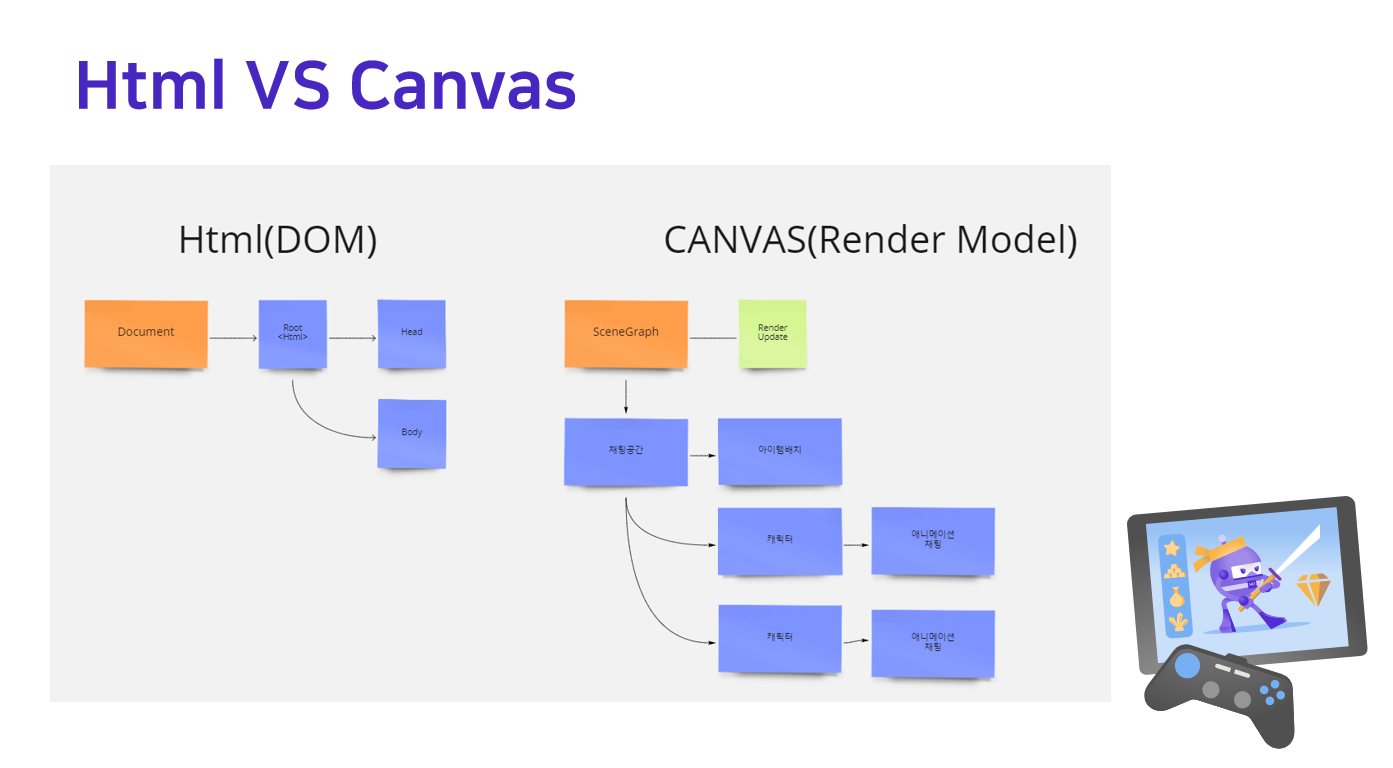
Blazor 컴포넌트에서, Canvas(브라우저)를 제어할수 있으며
통합된 C#코드로 브라우저내의 그래픽요소를 렌더링 할수 있습니다.
더 멋진 렌더링 코드로 업그레이드 해보세요~
@using Blazor.Extensions.Canvas
@using Blazor.Extensions.Canvas.Canvas2D;

    [JSInvokable]
    public async ValueTask RenderInBlazor(float timeStamp)
    {
        double fps = 1.0 / (DateTime.Now - LastRender).TotalSeconds;
        LastRender = DateTime.Now;

        await this.ctx.BeginBatchAsync();
        await this.ctx.ClearRectAsync(0, 0, BallField.Width, BallField.Height);
        await this.ctx.SetFillStyleAsync("#003366");
        await this.ctx.FillRectAsync(0, 0, BallField.Width, BallField.Height);
        await this.ctx.SetFontAsync("26px Segoe UI");
        await this.ctx.SetFillStyleAsync("#FFFFFF");
        await this.ctx.FillTextAsync("Blazor WebAssembly + HTML Canvas", 10, 30);
        await this.ctx.SetFontAsync("16px consolas");
        await this.ctx.FillTextAsync($"FPS: {fps:0.000}", 10, 50);
        await this.ctx.SetStrokeStyleAsync("#FFFFFF");

        await this.ctx.SetFontAsync("12px consolas");
        await this.ctx.SetStrokeStyleAsync("#FFFFFF");

        foreach (var ball in BallField.Balls)
        {
            await this.ctx.FillTextAsync($"{ball.Name}", ball.X -10, ball.Y -20);
            await this.ctx.BeginPathAsync();
            await this.ctx.ArcAsync(ball.X, ball.Y, ball.Radius, 0, 2 * Math.PI, false);
            await this.ctx.SetFillStyleAsync(ball.Color);
            await this.ctx.FillAsync();
            await this.ctx.StrokeAsync();
        }
        await this.ctx.EndBatchAsync();
    }
Blazor를 활용한 그래픽웹 채팅 - 닷넷conf 2022
Html VS Canvas
Html5 연습장데모 : http://psmon.x-y.net/pscoco/sample.html
순수 JS버전으로 간단한 애니메이션을 만들수 있는 자작 Canvas연습장 입니다.( html5지원안되는 ie6,7 점유율이 높은 시점 제작~ )
성능분리전략
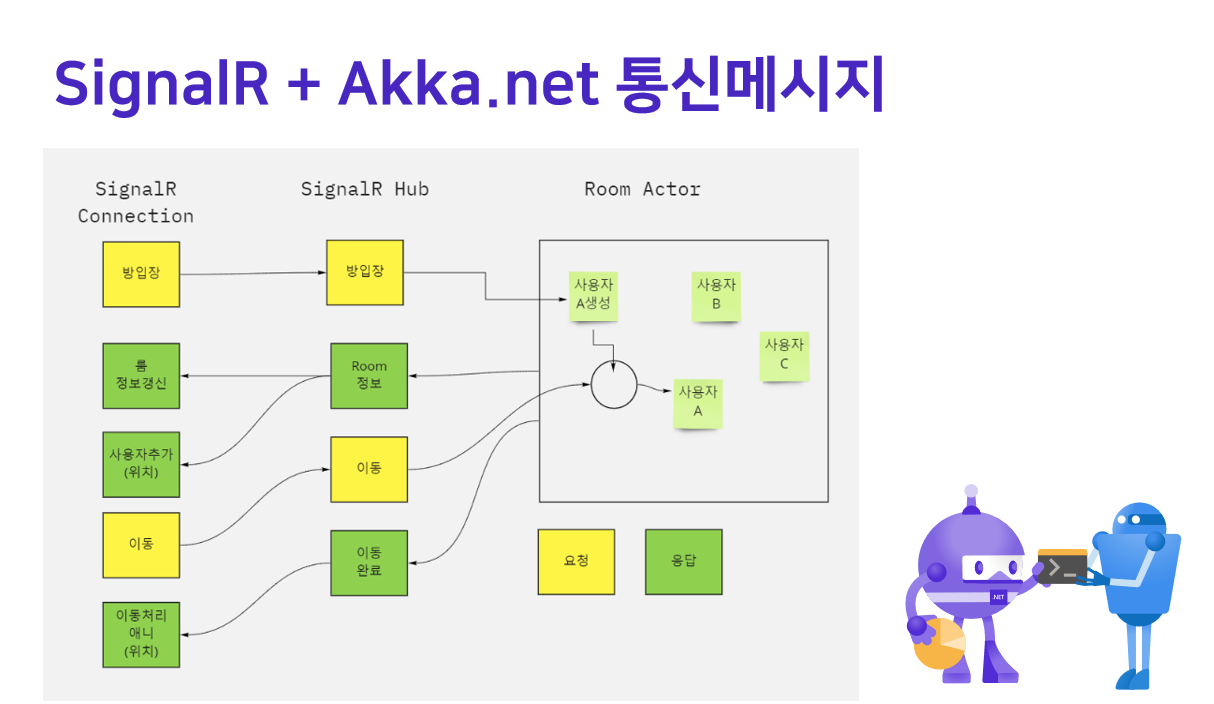
커넥션비용과 도메인의 로직 성능비용과 성능전략은 다릅니다.
일반적으로 웹소켓비용은 커넥션 비용이 높으며, 도메인의 경우 분산처리 복잡성이 증가할수 있습니다.
도메인 이벤트 Pub/Sub에 Redis를 활용할수도 있지만 저성능 전략중 하나입니다.
웹소켓은 최소한의 인증정보상태만유지하고 분산처리에 특화된 Akka-Actor를 활용할수 있습니다.
Node.js Socket.io 기반이라고 한다고하면 유사하게
AkkaServerLess를 선택할수 있습니다. 웹소켓 성능분리전략은 언어/프레임워크에 종속적인 내용이아닙니다.
https://developer.lightbend.com/docs/akka-serverless/javascript/index.html
추가참고 자료
애니메이션,캐릭터,맵등 그래픽 렌더링에 기능을 더 강화하고자 할때 참고할수 있습니다.
대부분 웹과별개로 2D게임 영역에서 오랫동안 축적된 개발방법들입니다.
- https://github.com/mizrael/BlazorCanvas - 렌더링구조 설계 ( 게임에 특화된 엔진을 채택할수도 있습니다. )
- https://www.mapeditor.org/ - 2D 맵툴