
Page History
...
MCP에 노트작성기능과 검색기능 그리고 사용히스토리기능을 하는 액터베이스의 서버기능을 만들어 MCP-Server를 업그레이드 시도해보겠습니다.
액터모델과 함께
...
시도된 변종 MCP 구성도
| draw.io Board Diagram | ||||||||||||||||||||
|---|---|---|---|---|---|---|---|---|---|---|---|---|---|---|---|---|---|---|---|---|
|
- MCP Client : MCP Tool을 셋업할때 MCP Server라고 부르지만~ 여기서 구성되는 전체그림에서는 Client이기때문에 Client로 표현했습니다.
- MCP Server : MCP Client에게 액터로 구성된 기능들을 제공합니다.
- RavenDB : 도큐먼트 DB로 몽고DB와 유사하지만 AICD,풀텍스트검색,반경검색,벡터검색,그래프검색등 다양한 검색을 보편적으로 지원하며 MCP및 RAG 연구할때 AI연구 DB로 심플하게 이용할수 있습니다. - RavenDB with Akka.net
- RecoderActor : 노트를 작성합니다.
- SearchActor : 노트검색기능을 제공합니다.
- HistoryActor : 노트작성및 검색 이용기록을 인메모리로 보유해 요청하면 이력을 제공합니다.
- MCP가 사용하는 기능이 확장되면 결국 MSA 구성으로 가거나 MSA화된 서비스를 이용하게 됩니다. 모놀리식으로 저장소를 구현하고 작동시킬수 있으며~ 필요하면 클러스터 구성으로 확장할수 있습니다.
- Akka Cluster - 더 자세한 내용은 AkkaCluster 편을 참고
코파일럿에서 여기서 구현된 MCP를 이용한 LLM샘플을 살펴보고 구현코드를 마지막으로 살펴보겠습니다.
...
데이터 저장확인
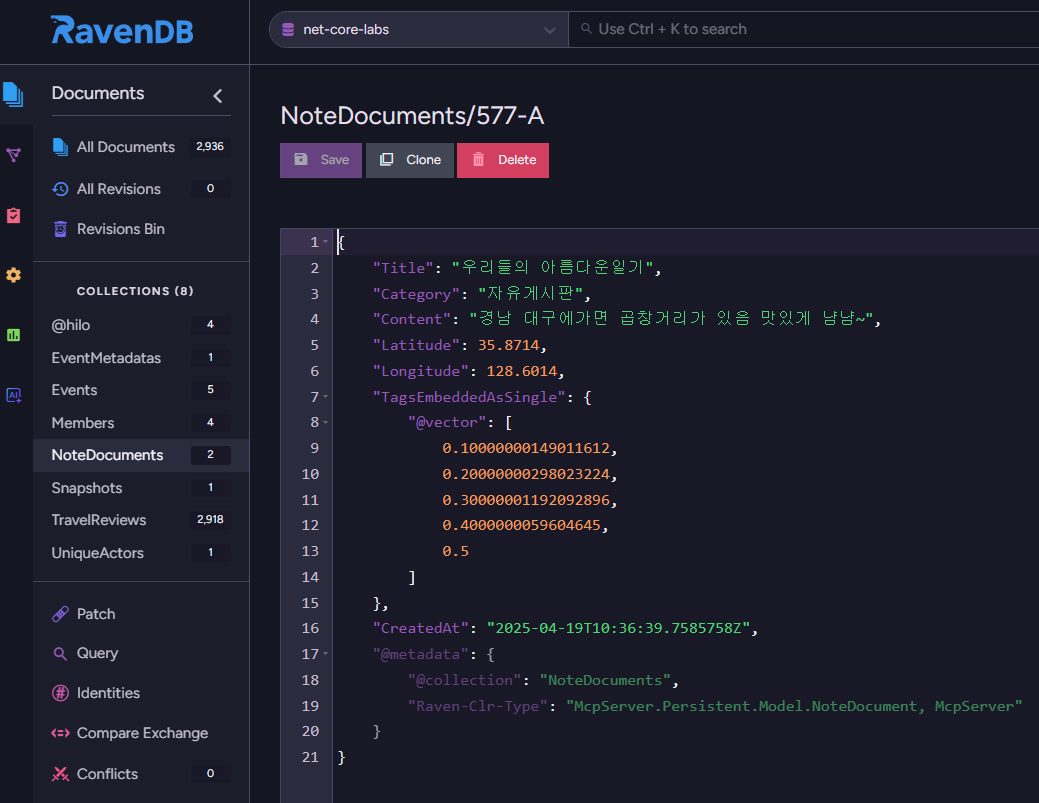
- LLM에 의해 데이터가 작 작성되었습니다.
- RAG에 활용되는 임베딩기능을 여기서 소개는 제외되었지만~ 벡터검색 기능을 지원해 이용및 추가로 활용할수도 있습니다.
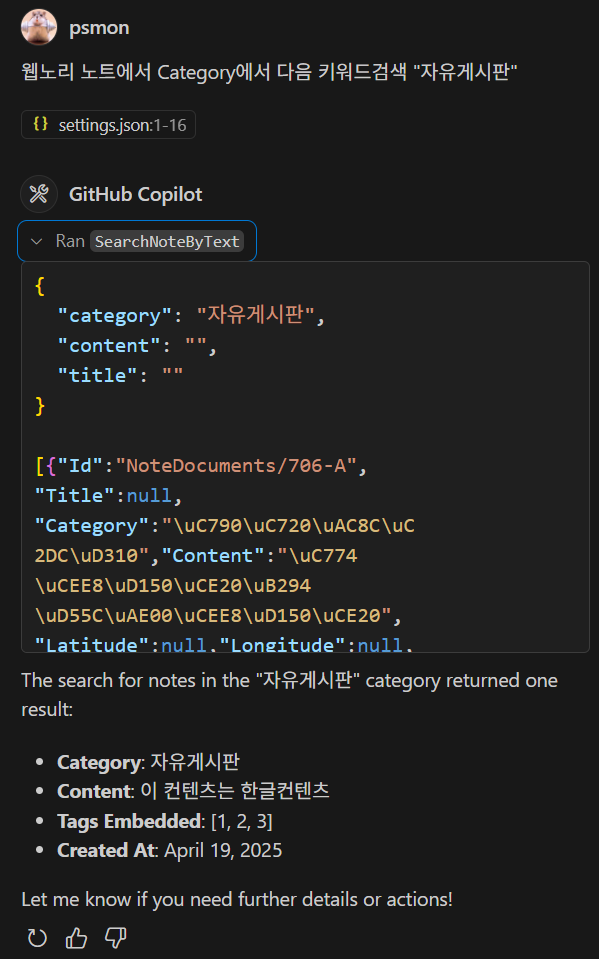
키워드검색
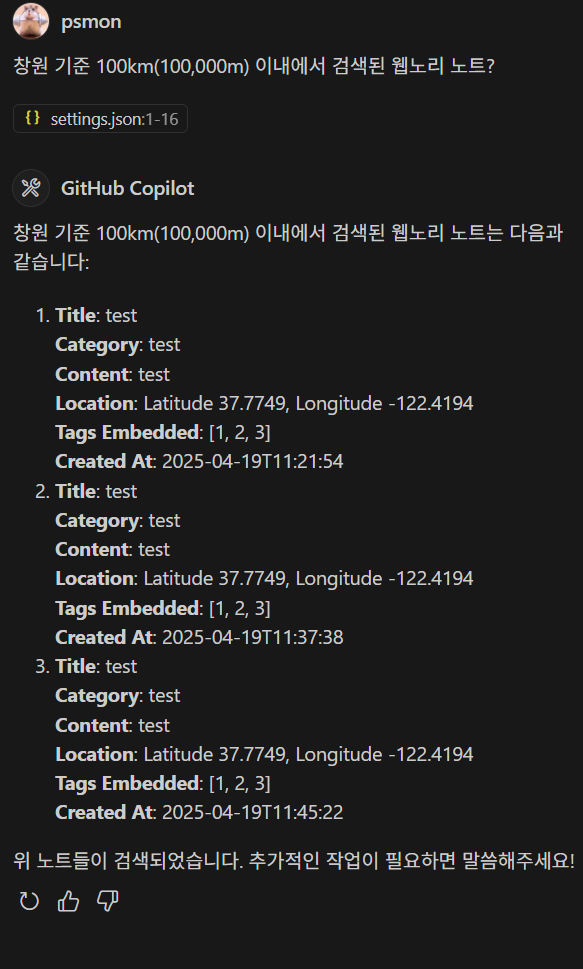
반경검색
사용히스토리
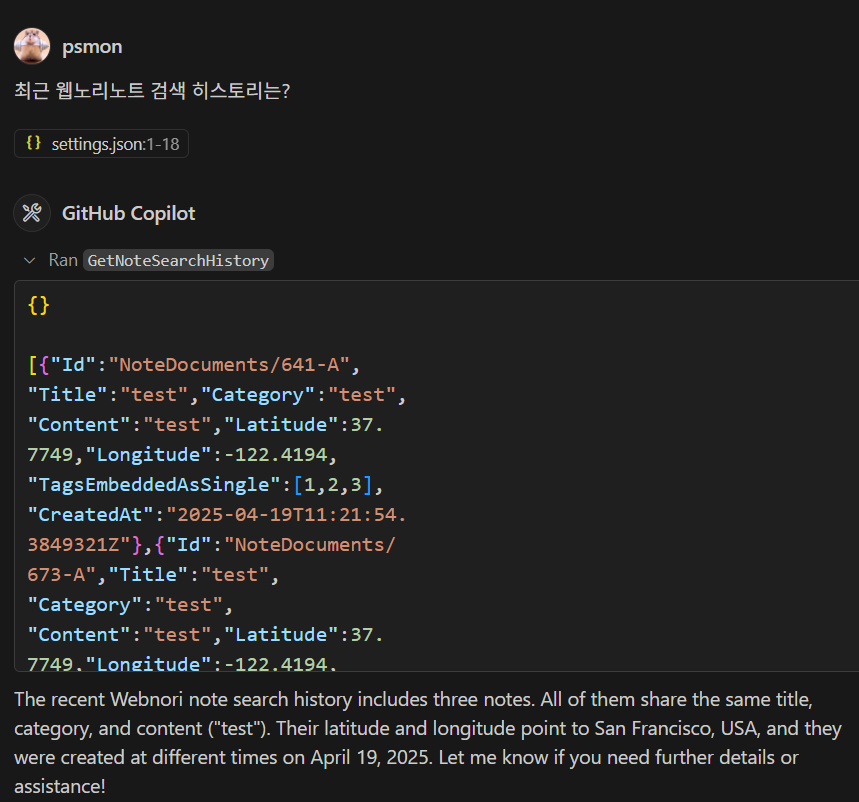
- 최근작성과 최근검색 히스토리를 제공합니다. - DB사용없이 인메모리
...
| Code Block | ||
|---|---|---|
| ||
public class SearchActor : ReceiveActor
{
    private readonly ILoggingAdapter _logger = Context.GetLogger();

    private IActorRef? testProbe;

    private readonly NoteRepository noteRepository;

    private IActorRef? historyActor;

    public SearchActor()
    {
        noteRepository = new NoteRepository();

        Receive<IActorRef>(actorRef =>
        {
            testProbe = actorRef;

            testProbe.Tell("done-ready");
        });

        Receive<SetHistoryActorCommand>(msg =>
        {
            historyActor = msg.HistoryActor;

            if (testProbe != null)
            {
                testProbe.Tell("done-set-history");
            }
        });

        Receive<SearchNoteByTextCommand>(command =>
        {
            _logger.Info($"SearchNoteByTextCommand: {command.Title}, {command.Content}, {command.Category}");

            var notes = noteRepository.SearchByText(command.Title, command.Content, command.Category);

            _logger.Info($"SearchNoteByTextCommand: {notes.Count} notes found");

            Sender.Tell(new SearchNoteActorResult()
            {
                Notes = notes
            });

            if (testProbe != null)
            {
                testProbe.Tell(new SearchNoteActorResult()
                {
                    Notes = notes
                });
            }

            if(historyActor != null)
            {
                historyActor.Tell(notes);
            }

        });

        Receive<SearchNoteByRadiusActorCommand>(command =>
        {
            var notes = noteRepository.SearchByRadius(command.Latitude, command.Longitude, command.Radius);

            Sender.Tell(new SearchNoteActorResult()
            {
                Notes = notes
            });

            if (testProbe != null)
            {
                testProbe.Tell(new SearchNoteActorResult()
                {
                    Notes = notes
                });
            }

            if(historyActor != null)
            {
                historyActor.Tell(notes);
            }

        });

        Receive<SearchNoteByVectorCommand>(command =>
        {
            var notes = noteRepository.SearchByVector(command.Vector, command.TopN);

            Sender.Tell(new SearchNoteActorResult()
            {
                Notes = notes
            });

            if (testProbe != null)
            {
                testProbe.Tell(new SearchNoteActorResult()
                {
                    Notes = notes
                });
            }

            if(historyActor != null)
            {
                historyActor.Tell(notes);
            }
        });
    }
} |
- 액터모델을 이용한 이벤트 기반의 코드이며 서버기능을 수행할수 있습니다. REST 인터페이스가 익숙하다면 액터모델을 걷어내고 RestAPI화해 교체할수 있는 영역의 코드입니다.
- HistoryActor와 상호작용해~ 검색을 시도하면 검색 히스토리를 남깁니다. 히스토리 작성이 성공할때까지 대기하지 않고~ 성공여부도 관심사가 아니며 단지필요한 이벤트를 발생시킵니다. FireAndForgot 패턴의 일종입니다.
- 이벤트 소싱등 CQRS패턴을 MCP내부 액터모델에 적용한다고하면 다음문서를참고해 능동적으로작동하는 액터모델을
- historyActor를 초기화중 지정이 될수있으며, 검색결과 이용기록을 보존합니다. 최근 검색한 노트를 요청해 다시 이용할수 있습니다.
- 이벤트 소싱등 CQRS패턴을 MCP내부 액터모델에 적용한다고하면 다음문서를참고해 능동적으로작동하는 액터모델을 이용 Agent코드를 작성할수도 있습니다.
...
| Code Block | ||
|---|---|---|
| ||
[McpServerToolType]
public static class NoteTool
{
    [McpServerTool, Description("웹노리 노트에 노트를 추가합니다.")]
    public static async Task<string> AddNote(ActorService actorService,
        [Description("노트의 제목으로 필수값입니다.")] string title,
        [Description("노트의 컨텐츠값으로 필수값입니다.")] string content,
        [Description("노트의 카테고리입니다.")] string? category,
        [Description("노트에 위치정보가 있다면 latitude를 입력")] double? latitude,
        [Description("노트에 위치정보가 있다면 longitude 입력")] double? longitude,
        [Description("노트에 임베딩된 값이 있다면 입력")] float[]? tagsEmbeddedAsSingle
        )
    {
        var note = new NoteDocument
        {
            Title = title,
            Category = category,
            Content = content,
            Latitude = latitude,
            Longitude = longitude,
            CreatedAt = DateTime.UtcNow,
            TagsEmbeddedAsSingle = new RavenVector<float>(tagsEmbeddedAsSingle)
        };

        actorService.RecordActor.Tell(new AddNoteCommand()
        {
            Title = title,
            Category = category,
            Content = content,
            Latitude = latitude,
            Longitude = longitude,
            TagsEmbeddedAsSingle = new RavenVector<float>(tagsEmbeddedAsSingle)
        }, ActorRefs.NoSender);

        return JsonSerializer.Serialize(note);
    }

    [McpServerTool, Description("웹노리 노트에서 Text검색을 합니다. 최소 하나값이 필수입니다.")]
    public static async Task<string> SearchNoteByText(ActorService actorService,
        [Description("웹노리 노트에서 타이틀을 키워드 검색합니다.")] string? title,
        [Description("웹노리 노트에서 컨텐츠를 키워드 검색합니다.")] string? content,
        [Description("웹노리 노트에서 카테고리를 키워드 검색합니다.")] string? category)
    {
        var result = await actorService.SearchActor.Ask(new SearchNoteByTextCommand()
        {
            Title = title,
            Content = content,
            Category = category
        }, TimeSpan.FromSeconds(5));

        if (result is SearchNoteActorResult searchResult)
        {
            return JsonSerializer.Serialize(searchResult.Notes);
        }

        return "Failed to get note history.";
    }

    [McpServerTool, Description("웹노리 노트에서 반경검색을 합니다. 모두 필수값입니다.")]
    public static async Task<string> SearchNoteByRadius(ActorService actorService,
        [Description("This is the latitude of the note ")] double latitude,
        [Description("This is the longitude of the note ")] double longitude,
        [Description("This is the radius(m) of the note ")] double radius)
    {
        var result = await actorService.SearchActor.Ask(new SearchNoteByRadiusActorCommand()
        {
            Latitude = latitude,
            Longitude = longitude,
            Radius = radius
        }, TimeSpan.FromSeconds(5));

        if (result is SearchNoteActorResult searchResult)
        {
            return JsonSerializer.Serialize(searchResult.Notes);
        }

        return "Failed to get note history.";
    }

    [McpServerTool, Description("웹노리 노트에서 벡터검색을 합니다. 모두 필수값입니다.")]
    public static async Task<string> SearchNoteByVector(ActorService actorService,
        [Description("This is the vector of the note  If there is no value, enter null.")] float[] vector,
        [Description("This is the top N of the note  If there is no value, enter null.")] int topN)
    {
        var result = await actorService.SearchActor.Ask(new SearchNoteByVectorCommand()
        {
            Vector = vector,
            TopN = topN
        }, TimeSpan.FromSeconds(5));

        if (result is SearchNoteActorResult searchResult)
        {
            return JsonSerializer.Serialize(searchResult.Notes);
        }

        return "Failed to get note history.";
    }


    [McpServerTool, Description("웹노리 노트에서 최근 추가된 노트를 가져옵니다.")]
    public static async Task<string> GetNoteHistory(ActorService actorService)
    {
        //SearchNoteActorResult
        var result = await actorService.HistoryActor.Ask(new GetNoteHistoryCommand(), TimeSpan.FromSeconds(5));

        if (result is SearchNoteActorResult searchResult)
        {
            return JsonSerializer.Serialize(searchResult.Notes);
        }

        return "Failed to get note history.";
    }

    [McpServerTool, Description("웹노리 노트에서 최근 검색된 노트를 가져옵니다.")]
    public static async Task<string> GetNoteSearchHistory(ActorService actorService)
    {
        //SearchNoteActorResult
        var result = await actorService.HistoryActor.Ask(new GetNoteSearchHistoryCommand(), TimeSpan.FromSeconds(5));

        if (result is SearchNoteActorResult searchResult)
        {
            return JsonSerializer.Serialize(searchResult.Notes);
        }

        return "Failed to get note history.";
    }


} |
- Agent LLM이 툴을 선택할때 필요로하는 Description과 구현체를 정리하며 MCP Server에서 사실상 핵심코드영역입니다.
- 작동코드는 모두 액터객체를 이용한 이벤트 방식을 사용합니다.
- Tell : 응답값을 바로 알필요가 없을이 이벤트 전송시사용
- Ask : 이벤트 전송후 해당 이벤트에 반응하는 응답값을 대기할때 사용
- Local Actor를 이용할수도 있지만 복제구성을 해 Client-Server 작동으로 구분하였으며 여기서는 별도로 구동된 Remote에 위치한 서버의 액터를 이용합니다.
- 초기개발은 단일Local StandAlone으로만 작동가능하며 이후 전략에따라 실제 작동액터는 별도 구성된 서버로 코드변경없이 분리할수 있는것이 액터모델의 장점입니다.
클라이언트 서버모델
| Code Block | ||
|---|---|---|
| ||
public class ActorService
{
    private readonly ActorSystem actorSystem;

    public IActorRef SearchActor { get; set; }

    public IActorRef RecordActor { get; set; }

    public IActorRef HistoryActor { get; set; }

    public ActorService(bool serverMode)
    {
        Console.WriteLine($"ActorService initialized in {(serverMode ? "Server" : "Client")} mode.");

        // HOCON 설정
        var config = ConfigurationFactory.ParseString($@"
            akka {{
                actor {{
                    provider = ""Akka.Remote.RemoteActorRefProvider, Akka.Remote""
                }}
                remote {{
                    dot-netty.tcp {{
                        hostname = ""127.0.0.1""
                        port = {(serverMode ? 5500 : 0)} // 서버 모드일 때만 포트 5500 사용
                    }}
                }}
            }}
        ");

        actorSystem = ActorSystem.Create("MyActorSystem", config);

        if (serverMode)
        {
            // 서버 모드일 때만 작동액터 생성 : MCP Server
            SearchActor = actorSystem.ActorOf<SearchActor>("search-actor");
            RecordActor = actorSystem.ActorOf<RecordActor>("record-actor");
            HistoryActor = actorSystem.ActorOf<HistoryActor>("history-actor");

            RecordActor.Tell(new SetHistoryActorCommand()
            {
                HistoryActor = HistoryActor
            });

            SearchActor.Tell(new SetHistoryActorCommand()
            {
                HistoryActor = HistoryActor
            });
        }
        else
        {
            // 클라이언트 모드일 때 원격 액터 참조 : MCP Client
            var remoteAddress = "akka.tcp://MyActorSystem@127.0.0.1:5500";
            SearchActor = actorSystem.ActorSelection($"{remoteAddress}/user/search-actor")
                .ResolveOne(TimeSpan.FromSeconds(3)).Result;

            RecordActor = actorSystem.ActorSelection($"{remoteAddress}/user/record-actor")
                .ResolveOne(TimeSpan.FromSeconds(3)).Result;

            HistoryActor = actorSystem.ActorSelection($"{remoteAddress}/user/history-actor")
                .ResolveOne(TimeSpan.FromSeconds(3)).Result;
        }
    }

} |
...
- 동일저장소에서 clientMode 옵션을 주면 클라이언트 모드로 작동하며 MCP자체에 대응합니다.
...
닷넷에서 MCP구현시 확장가능 요소
ML.NET
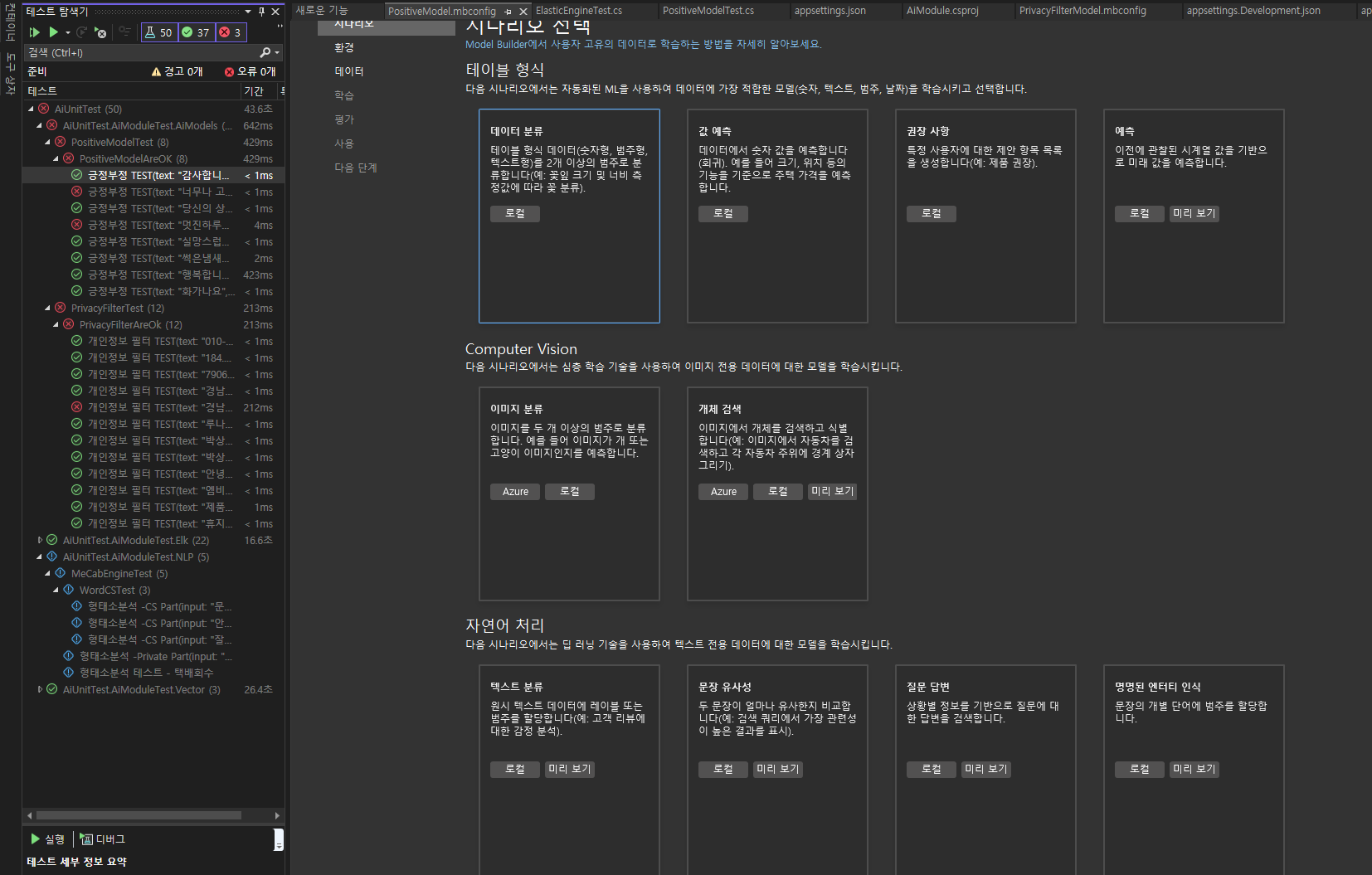
- ML.NET을 IDE와 통합된 환경에서 이용할수 있습니다.
- 이 로컬 IDE전용 ML기능은 JetBrain IDE가 아직 제공하지 않습니다. - VisualStudio Only
...
- Context를 처리하는 협업가능한 작은 단위의 Agent를 액터로 분산배치및 병렬 처리를 할수 있습니다. OpenAI의경우대응하는플랫폼으로Ray를채택
이상 MCP와 닷넷이 제공하는 MCPContext 구현코드작성과 액터모델을 이용해 Client(Mcp,리모트액터호출)/Server Mode(액터기능제공) 로 분리작동해본 변종 실험이였습니다.
...