

Page History
최근 업데이트된 카페24 API 호출제약 스펙가이드에 따라 액터모델을 이용해 안전하게 호출처리하는 심플 모듈 작성을
사전에 준비된 스킬모드를 이용해 구현시도를 해보겠습니다.
카페24 API SPEC
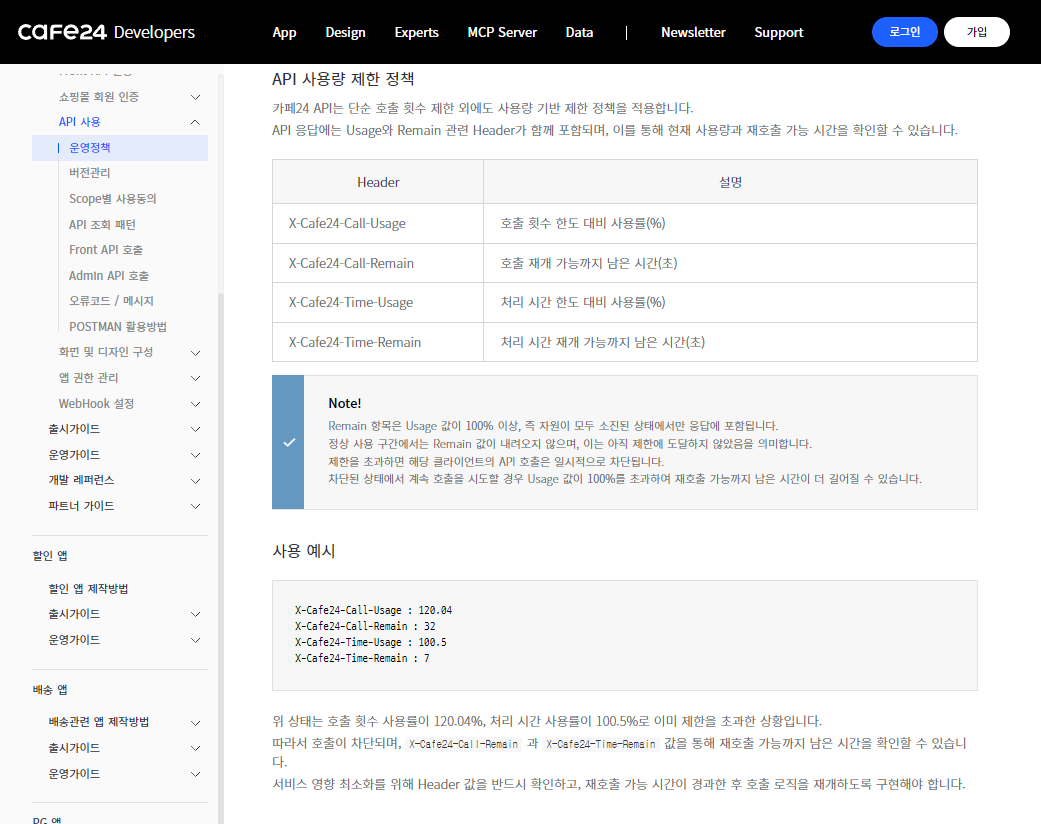
...
| Code Block | ||||||
|---|---|---|---|---|---|---|
| ||||||
# Cafe24 API 안전 호출 장치 사용 가이드

## 개요

카페24 API의 Leaky Bucket 호출 제약 정책에 대응하는 **Akka Streams 기반 백프레셔 안전 호출 장치**입니다. 사용자는 API 호출 제약(TPS, 429 에러, 버킷 상태)을 전혀 신경 쓰지 않고, 요청을 보내고 결과만 받으면 됩니다.

## 핵심 컴포넌트

### SafeApiCallerActor

호출 제약을 내부적으로 처리하는 재사용 가능한 액터입니다.

```java
// 생성: API 기본 URL + 초당 최대 호출 수 설정
ActorRef caller = system.actorOf(
    SafeApiCallerActor.props("https://api.cafe24.com", 2),
    "cafe24-api-caller"
);

// 요청: 단어와 응답 받을 ActorRef 전달
caller.tell(new ApiRequest("hello", myActorRef), ActorRef.noSender());

// 응답: ApiResponse 메시지로 수신
// - word: 원본 요청 단어
// - result: API 응답 본문
// - statusCode: HTTP 상태 코드
// - bucketUsed/bucketMax: 버킷 상태
```

### 내부 동작 (유압장치 비유)

```
요청 투입 ──→ [버퍼 탱크] ──→ [유량 조절 밸브] ──→ [비동기 펌프] ──→ 응답 배출
  (tell)     (100건 버퍼)   (throttle 2/s)   (mapAsync HTTP)   (replyTo.tell)
                                                    │
                                              [압력 게이지]
                                         (X-Api-Call-Limit 헤더 읽기)
                                                    │
                                          사용률 > 80%: +500ms 지연
                                          사용률 > 50%: +200ms 지연
                                          429 응답: 대기 후 재시도
```

## 사용 방법

### 1. 기본 사용법 (단일 API)

```java
// ActorSystem 초기화
ActorSystem system = ActorSystem.create("my-system");

// 안전 호출 장치 생성 (초당 2건 제한)
ActorRef apiCaller = system.actorOf(
    SafeApiCallerActor.props("https://mallid.cafe24api.com/api/v2", 2),
    "product-api"
);

// 요청 보내기 (호출 제약은 장치가 알아서 처리)
apiCaller.tell(new ApiRequest("products/count", self()), self());

// 응답 처리
receive(ApiResponse.class, response -> {
    System.out.println("결과: " + response.result());
    System.out.println("버킷 상태: " + response.bucketUsed() + "/" + response.bucketMax());
});
```

### 2. 다중 API 엔드포인트 (장치 재사용)

```java
// 서로 다른 API 엔드포인트에 독립적인 안전 호출 장치 생성
ActorRef productApi = system.actorOf(
    SafeApiCallerActor.props("https://mallid.cafe24api.com/api/v2/products", 2),
    "product-api"
);

ActorRef orderApi = system.actorOf(
    SafeApiCallerActor.props("https://mallid.cafe24api.com/api/v2/orders", 2),
    "order-api"
);

// 각 장치는 독립적으로 백프레셔 적용
productApi.tell(new ApiRequest("count", self()), self());
orderApi.tell(new ApiRequest("list", self()), self());
```

### 3. 대량 처리 (burst 안전)

```java
// 100건의 요청을 한번에 투입해도 안전
for (int i = 0; i < 100; i++) {
    apiCaller.tell(new ApiRequest("item-" + i, self()), self());
}
// → throttle이 초당 2건씩 처리
// → 버킷 오버플로 없이 전부 성공
// → 약 50초 후 모든 응답 수신
```

## 성능 튜닝

### throttle 설정 가이드

| Cafe24 버킷 설정 | 권장 throttle | 안전 마진 |
|-----------------|--------------|----------|
| capacity=40, leak=2/s | `maxRequestsPerSecond=2` | 최대 안전 (버킷 거의 미사용) |
| capacity=40, leak=2/s | `maxRequestsPerSecond=3` | 적절 (적응형 지연으로 보완) |
| capacity=40, leak=2/s | `maxRequestsPerSecond=5` | 공격적 (적응형 지연 의존) |

**권장**: `maxRequestsPerSecond <= leak rate`로 설정하면 버킷이 거의 차지 않아 가장 안전합니다.

### 버퍼 크기 조절

```java
// Source.actorRef의 버퍼 크기 (현재 100)
// 대량 burst가 예상되면 증가 가능
Source.<StreamEnvelope>actorRef(500, OverflowStrategy.dropNew())
```

| 버퍼 크기 | 용도 |
|----------|------|
| 100 | 일반 사용 (기본값) |
| 500 | 대량 burst 허용 |
| 1000 | 극대량 처리 |

### OverflowStrategy 선택

| 전략 | 설명 | 권장 상황 |
|------|------|----------|
| `dropNew()` | 버퍼 초과 시 새 요청 폐기 | 최신 요청 우선 (현재 설정) |
| `dropHead()` | 가장 오래된 요청 폐기 | 최신 요청 우선 |
| `backpressure()` | upstream에 압력 전파 | Source.queue 사용 시 |
| `fail()` | 스트림 실패 | 데이터 손실 불허 시 |

## 적응형 백프레셔 상세

SafeApiCallerActor는 API 응답 헤더를 읽어 동적으로 호출 속도를 조절합니다:

```
X-Api-Call-Limit: 8/10  → 사용률 80% → +500ms 지연 추가
X-Api-Call-Limit: 5/10  → 사용률 50% → +200ms 지연 추가
X-Api-Call-Limit: 3/10  → 사용률 30% → 추가 지연 없음
HTTP 429 응답           → X-Cafe24-Call-Remain 초만큼 대기 후 재시도 (최대 3회)
```

이 메커니즘은 throttle의 기본 유량 제한 위에 추가로 작동하여 이중 안전장치 역할을 합니다.

## 실제 Cafe24 API 적용 시 변경 사항

1. **DummyCafe24Server 제거**: 실제 API URL로 교체
2. **인증 헤더 추가**: `HttpRequest.newBuilder().header("Authorization", "Bearer " + token)`
3. **요청/응답 포맷 변경**: Messages.java의 ApiRequest/ApiResponse를 실제 API 스키마에 맞게 확장
4. **throttle 값 조정**: 실제 Cafe24 정책(capacity=40, leak=2/s)에 맞게 설정

```java
// 실제 적용 예시
ActorRef caller = system.actorOf(
    SafeApiCallerActor.props("https://mallid.cafe24api.com/api/v2", 2),
    "cafe24-safe-caller"
);
```

## 의존성

```groovy
dependencies {
    implementation "com.typesafe.akka:akka-actor_2.13:2.7.0"
    implementation "com.typesafe.akka:akka-stream_2.13:2.7.0"
}
```
|
생성된코드
| Code Block | ||
|---|---|---|
| ||
package com.example.cafe24.api;

import com.sun.net.httpserver.HttpExchange;
import com.sun.net.httpserver.HttpServer;

import java.io.IOException;
import java.io.OutputStream;
import java.net.InetSocketAddress;
import java.net.URLDecoder;
import java.nio.charset.StandardCharsets;
import java.util.concurrent.Executors;
import java.util.concurrent.ScheduledExecutorService;
import java.util.concurrent.TimeUnit;
import java.util.concurrent.atomic.AtomicInteger;

/**
 * Cafe24 API를 시뮬레이션하는 더미 서버.
 *
 * <p>Leaky Bucket 알고리즘으로 요청 수를 제한합니다.
 * <ul>
 *   <li>버킷 용량(capacity)을 초과하면 429 Too Many Requests 반환</li>
 *   <li>버킷은 매초 leakRate만큼 자동 감소</li>
 *   <li>응답 헤더: X-Api-Call-Limit, X-Cafe24-Call-Usage, X-Cafe24-Call-Remain</li>
 * </ul>
 *
 * <p>응답 규칙: "hello" 요청 → "world" 반환, 나머지 단어는 그대로 에코.
 */
public class DummyCafe24Server {

    private final HttpServer server;
    private final int bucketCapacity;
    private final int leakRatePerSecond;
    private final AtomicInteger currentBucketLevel = new AtomicInteger(0);
    private final ScheduledExecutorService leakScheduler;

    public DummyCafe24Server(int port, int bucketCapacity, int leakRatePerSecond) throws IOException {
        this.bucketCapacity = bucketCapacity;
        this.leakRatePerSecond = leakRatePerSecond;

        // Leaky Bucket 드레인: 매초 leakRate만큼 버킷 수위 감소
        this.leakScheduler = Executors.newSingleThreadScheduledExecutor(r -> {
            Thread t = new Thread(r, "leaky-bucket-drain");
            t.setDaemon(true);
            return t;
        });
        this.leakScheduler.scheduleAtFixedRate(
                () -> currentBucketLevel.updateAndGet(c -> Math.max(0, c - leakRatePerSecond)),
                1, 1, TimeUnit.SECONDS
        );

        this.server = HttpServer.create(new InetSocketAddress(port), 0);
        this.server.createContext("/api/echo", this::handleEcho);
        this.server.setExecutor(Executors.newFixedThreadPool(4));
    }

    public void start() {
        server.start();
    }

    public void stop() {
        server.stop(0);
        leakScheduler.shutdown();
    }

    /** 테스트 간 버킷 상태 초기화 */
    public void reset() {
        currentBucketLevel.set(0);
    }

    public int getCurrentBucketLevel() {
        return currentBucketLevel.get();
    }

    public int getBucketCapacity() {
        return bucketCapacity;
    }

    private void handleEcho(HttpExchange exchange) throws IOException {
        if (!"GET".equals(exchange.getRequestMethod())) {
            exchange.sendResponseHeaders(405, -1);
            return;
        }

        int level = currentBucketLevel.incrementAndGet();

        if (level > bucketCapacity) {
            // 버킷 초과 - 429 반환 (실제 소비하지 않으므로 감소)
            currentBucketLevel.decrementAndGet();

            double usagePercent = ((double) level / bucketCapacity) * 100;
            int remainSeconds = (int) Math.ceil((double) (level - bucketCapacity) / leakRatePerSecond) + 1;

            exchange.getResponseHeaders().add("X-Api-Call-Limit", level + "/" + bucketCapacity);
            exchange.getResponseHeaders().add("X-Cafe24-Call-Usage", String.format("%.1f", usagePercent));
            exchange.getResponseHeaders().add("X-Cafe24-Call-Remain", String.valueOf(remainSeconds));

            byte[] body = "Too Many Requests".getBytes(StandardCharsets.UTF_8);
            exchange.sendResponseHeaders(429, body.length);
            try (OutputStream os = exchange.getResponseBody()) {
                os.write(body);
            }
            return;
        }

        // 파라미터 파싱
        String word = parseWordParam(exchange.getRequestURI().getQuery());

        // "hello" → "world", 나머지는 그대로 에코
        String result = "hello".equals(word) ? "world" : word;

        // 응답 헤더 설정
        double usagePercent = ((double) level / bucketCapacity) * 100;
        exchange.getResponseHeaders().add("X-Api-Call-Limit", level + "/" + bucketCapacity);
        exchange.getResponseHeaders().add("X-Cafe24-Call-Usage", String.format("%.1f", usagePercent));
        exchange.getResponseHeaders().add("Content-Type", "text/plain; charset=utf-8");

        byte[] responseBytes = result.getBytes(StandardCharsets.UTF_8);
        exchange.sendResponseHeaders(200, responseBytes.length);
        try (OutputStream os = exchange.getResponseBody()) {
            os.write(responseBytes);
        }
    }

    private String parseWordParam(String query) {
        if (query == null) return "";
        for (String param : query.split("&")) {
            String[] pair = param.split("=", 2);
            if (pair.length == 2 && "word".equals(pair[0])) {
                return URLDecoder.decode(pair[1], StandardCharsets.UTF_8);
            }
        }
        return "";
    }
}
|
| Code Block | ||||
|---|---|---|---|---|
| ||||
package com.example.cafe24.actor;

import akka.actor.AbstractActor;
import akka.actor.ActorRef;
import akka.actor.Props;
import akka.event.Logging;
import akka.event.LoggingAdapter;
import akka.stream.OverflowStrategy;
import akka.stream.SystemMaterializer;
import akka.stream.ThrottleMode;
import akka.stream.javadsl.Sink;
import akka.stream.javadsl.Source;
import com.example.cafe24.message.Messages.ApiRequest;
import com.example.cafe24.message.Messages.ApiResponse;
import com.example.cafe24.message.Messages.StreamEnvelope;
import com.example.cafe24.message.Messages.StreamResult;
import scala.concurrent.duration.FiniteDuration;

import java.net.URI;
import java.net.http.HttpClient;
import java.net.http.HttpRequest;
import java.net.http.HttpResponse;
import java.time.Duration;
import java.util.concurrent.CompletableFuture;
import java.util.concurrent.CompletionStage;
import java.util.concurrent.TimeUnit;

/**
 * Cafe24 API를 백프레셔를 적용하여 안전하게 호출하는 액터.
 *
 * <p>내부에 Akka Streams 파이프라인(유압장치)을 구성하여:
 * <ul>
 *   <li>Source.actorRef: 요청 유입구 (밸브)</li>
 *   <li>throttle: 유량 조절기 (초당 maxRequestsPerSecond 제한)</li>
 *   <li>mapAsync: 비동기 HTTP 호출 펌프 (블로킹 없음)</li>
 *   <li>Sink.foreach: 응답 배출구 (원래 요청자에게 전달)</li>
 * </ul>
 *
 * <p>사용자는 {@link ApiRequest}를 보내고 {@link ApiResponse}를 받기만 하면 됩니다.
 * 호출 제약(백프레셔, TPS, 429 재시도)은 이 액터가 모두 처리합니다.
 *
 * <p><b>재사용 방법</b>: apiBaseUrl과 maxRequestsPerSecond를 설정하여
 * 다양한 Cafe24 API 엔드포인트에 대해 독립적인 안전 호출 장치를 생성할 수 있습니다.
 */
public class SafeApiCallerActor extends AbstractActor {

    private final LoggingAdapter log = Logging.getLogger(getContext().getSystem(), this);
    private final String apiBaseUrl;
    private final int maxRequestsPerSecond;
    private final HttpClient httpClient;
    private ActorRef streamEntry;

    public SafeApiCallerActor(String apiBaseUrl, int maxRequestsPerSecond) {
        this.apiBaseUrl = apiBaseUrl;
        this.maxRequestsPerSecond = maxRequestsPerSecond;
        this.httpClient = HttpClient.newBuilder()
                .connectTimeout(Duration.ofSeconds(5))
                .build();
    }

    public static Props props(String apiBaseUrl, int maxRequestsPerSecond) {
        return Props.create(SafeApiCallerActor.class, apiBaseUrl, maxRequestsPerSecond);
    }

    @Override
    public void preStart() {
        var materializer = SystemMaterializer.get(getContext().getSystem()).materializer();

        // Akka Streams 백프레셔 파이프라인 구성
        // Source.actorRef(유입) → throttle(유량제한) → mapAsync(비동기호출) → Sink(응답전달)
        streamEntry = Source.<StreamEnvelope>actorRef(100, OverflowStrategy.dropNew())
                .throttle(
                        maxRequestsPerSecond,
                        FiniteDuration.create(1, TimeUnit.SECONDS),
                        maxRequestsPerSecond,
                        ThrottleMode.shaping()
                )
                .mapAsync(1, this::callApiWithAdaptiveBackpressure)
                .to(Sink.foreach(this::deliverResponse))
                .run(materializer);

        log.info("SafeApiCallerActor 초기화 완료 - baseUrl={}, maxRps={}", apiBaseUrl, maxRequestsPerSecond);
    }

    @Override
    public Receive createReceive() {
        return receiveBuilder()
                .match(ApiRequest.class, request -> {
                    // 요청을 스트림 파이프라인에 투입 (논블로킹)
                    streamEntry.tell(new StreamEnvelope(request), getSelf());
                })
                .build();
    }

    /**
     * 적응형 백프레셔를 적용한 API 호출.
     * 응답 헤더의 버킷 사용률에 따라 추가 지연을 동적으로 적용합니다.
     */
    private CompletionStage<StreamResult> callApiWithAdaptiveBackpressure(StreamEnvelope envelope) {
        return executeHttpCall(envelope, 0)
                .exceptionally(ex -> {
                    log.error("API 호출 실패: {}", ex.getMessage());
                    return new StreamResult(
                            envelope.request(),
                            new ApiResponse(envelope.request().word(), "ERROR: " + ex.getMessage(), 500, 0, 0)
                    );
                });
    }

    private CompletionStage<StreamResult> executeHttpCall(StreamEnvelope envelope, int retryCount) {
        String word = envelope.request().word();
        HttpRequest request = HttpRequest.newBuilder()
                .uri(URI.create(apiBaseUrl + "/api/echo?word=" + word))
                .timeout(Duration.ofSeconds(5))
                .GET()
                .build();

        return httpClient.sendAsync(request, HttpResponse.BodyHandlers.ofString())
                .thenCompose(response -> {
                    int statusCode = response.statusCode();

                    if (statusCode == 429 && retryCount < 3) {
                        // Rate limited - X-Cafe24-Call-Remain 헤더 기반 대기 후 재시도
                        String remainStr = response.headers()
                                .firstValue("X-Cafe24-Call-Remain").orElse("1");
                        int waitSeconds = Integer.parseInt(remainStr);
                        log.warning("429 응답 수신 - {}초 후 재시도 (retry={})", waitSeconds, retryCount + 1);

                        return delay(waitSeconds * 1000L)
                                .thenCompose(v -> executeHttpCall(envelope, retryCount + 1));
                    }

                    // 응답 헤더에서 버킷 상태 파싱
                    String callLimit = response.headers()
                            .firstValue("X-Api-Call-Limit").orElse("0/10");
                    String[] parts = callLimit.split("/");
                    int bucketUsed = Integer.parseInt(parts[0]);
                    int bucketMax = Integer.parseInt(parts[1]);
                    double usageRatio = (double) bucketUsed / bucketMax;

                    StreamResult result = new StreamResult(
                            envelope.request(),
                            new ApiResponse(word, response.body(), statusCode, bucketUsed, bucketMax)
                    );

                    // 적응형 백프레셔: 버킷 사용률 기반 추가 지연
                    // 유압장치의 압력 게이지를 읽고 밸브를 조절하는 것과 같은 원리
                    long adaptiveDelayMs = 0;
                    if (usageRatio > 0.8) {
                        adaptiveDelayMs = 500;
                        log.info("버킷 사용률 {}% - 500ms 추가 지연 적용", (int) (usageRatio * 100));
                    } else if (usageRatio > 0.5) {
                        adaptiveDelayMs = 200;
                    }

                    if (adaptiveDelayMs > 0) {
                        return delay(adaptiveDelayMs).thenApply(v -> result);
                    }
                    return CompletableFuture.completedFuture(result);
                });
    }

    /** 스트림 출구: 완료된 응답을 원래 요청자에게 전달 */
    private void deliverResponse(StreamResult result) {
        ActorRef replyTo = result.originalRequest().replyTo();
        replyTo.tell(result.response(), getSelf());
    }

    /** 논블로킹 지연 (Thread.sleep 대신 delayedExecutor 사용) */
    private CompletionStage<Void> delay(long millis) {
        return CompletableFuture.supplyAsync(
                () -> null,
                CompletableFuture.delayedExecutor(millis, TimeUnit.MILLISECONDS)
        );
    }
}
|